
PrestaShop 9.2 Beta is open for feedback!
Start testing the native One Page Checkout module, the new Ask AI assistant, and the Extra Properties system for developers.
PrestaShop 9.2 Beta is here, and it includes several major additions that you can already start exploring and sharing feedback on. Your input is valuable for the final release of PrestaShop 9.2.
We are excited to announce the availability of the first beta version of PrestaShop 9.2. This release brings a native One Page Checkout module included in the bundle, a new “Ask AI” assistant in the back office, and a brand new Extra Properties system that gives developers a clean, native way to extend core entities.
Download & testing instructions
What’s inside PrestaShop 9.2 Beta?
Here are the main features you will find in this new version, along with more information for each one to help you prepare for 9.2.
One Page Checkout - native module for a faster, smoother checkout experience
Until now, PrestaShop shipped only with a native multi-step checkout spread across separate pages. With 9.2, we are including a native One Page Checkout module in the bundle, bringing the entire checkout experience together onto a single page.
A modern, integrated one-page checkout has become a must-have for ecommerce, especially for stores with a high volume of mobile traffic. Relying solely on third-party modules created inter-compatibility issues that ultimately harmed the merchant experience, so we decided to bring this capability into the project itself.
The goal is straightforward: a faster, smoother checkout that helps reduce friction and improve conversion, without leaving merchants dependent on external solutions.
In the article below, we also share the documentation for module & theme authors to make sure their solutions are compatible with OPC.
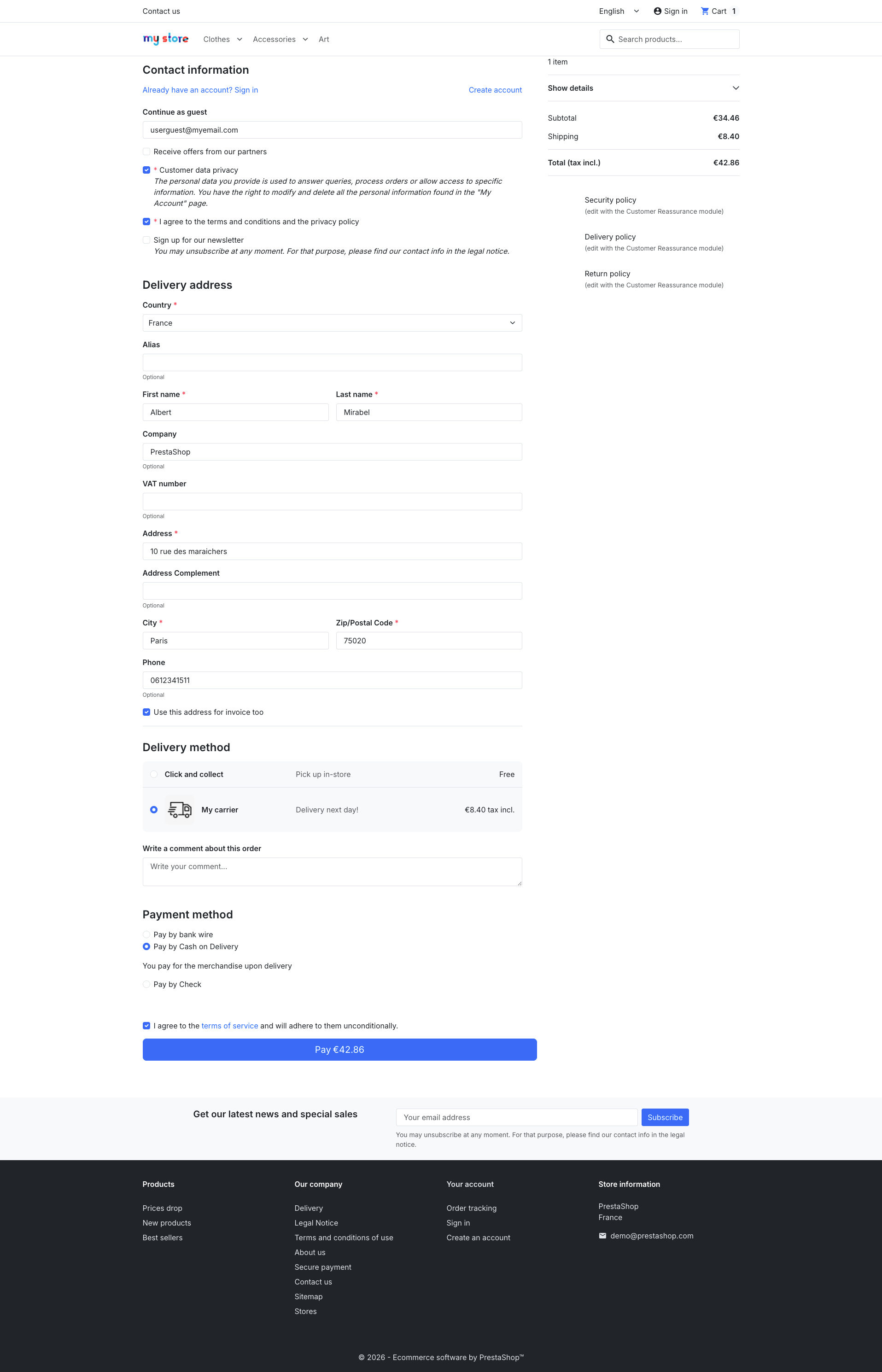 All checkout steps gathered on a single page
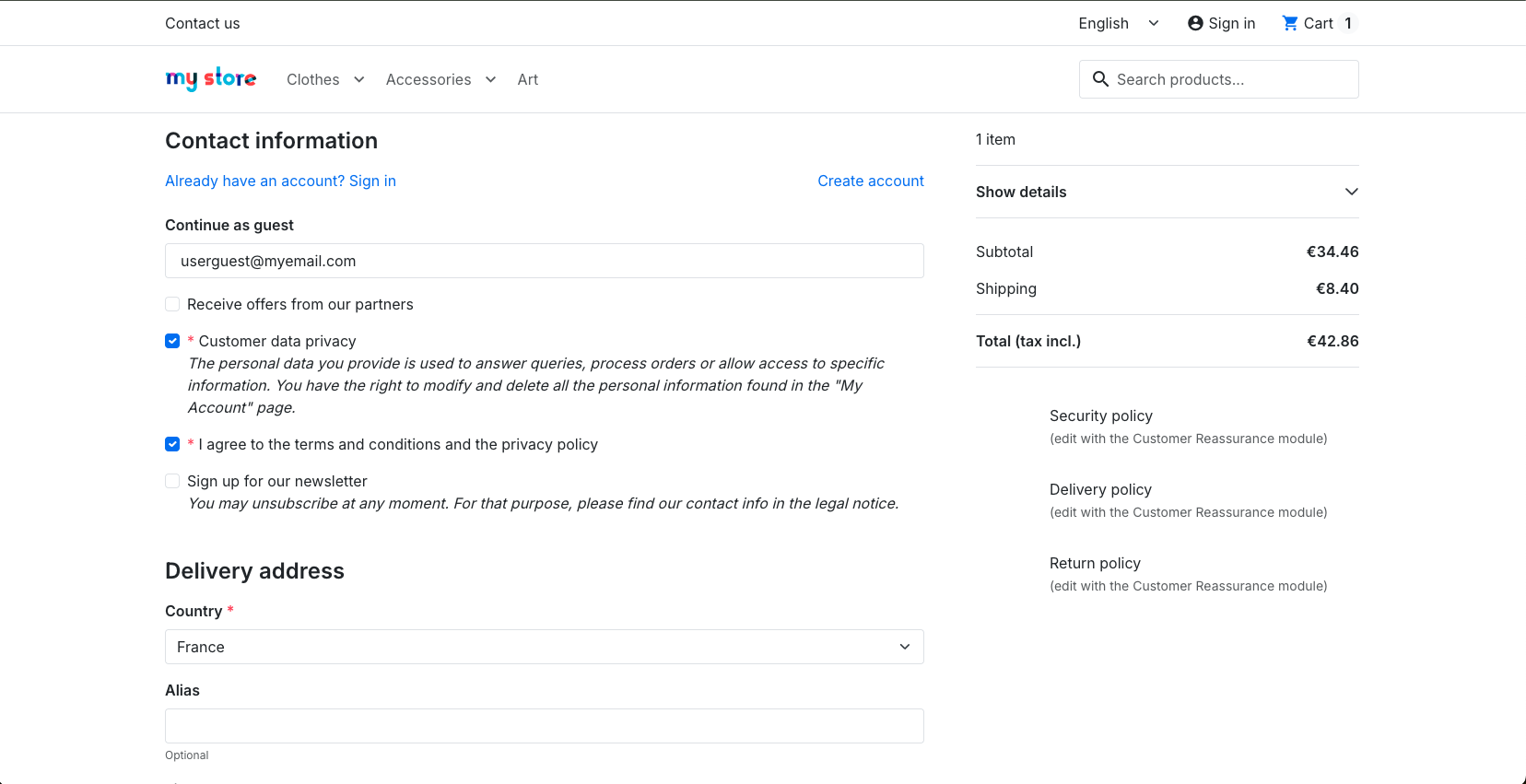 Guest-first experience, with no account creation required
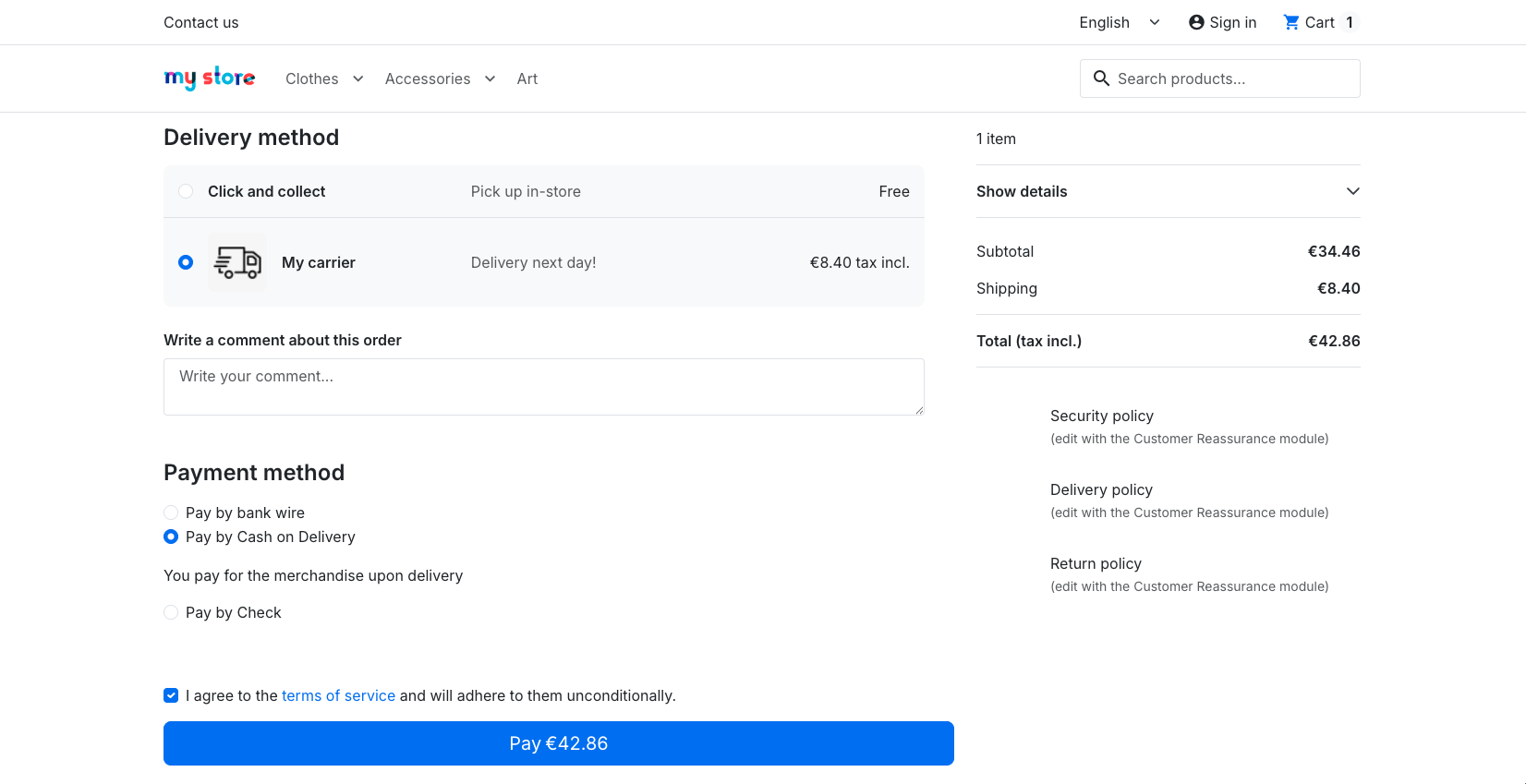 Delivery and payment, with no page reload
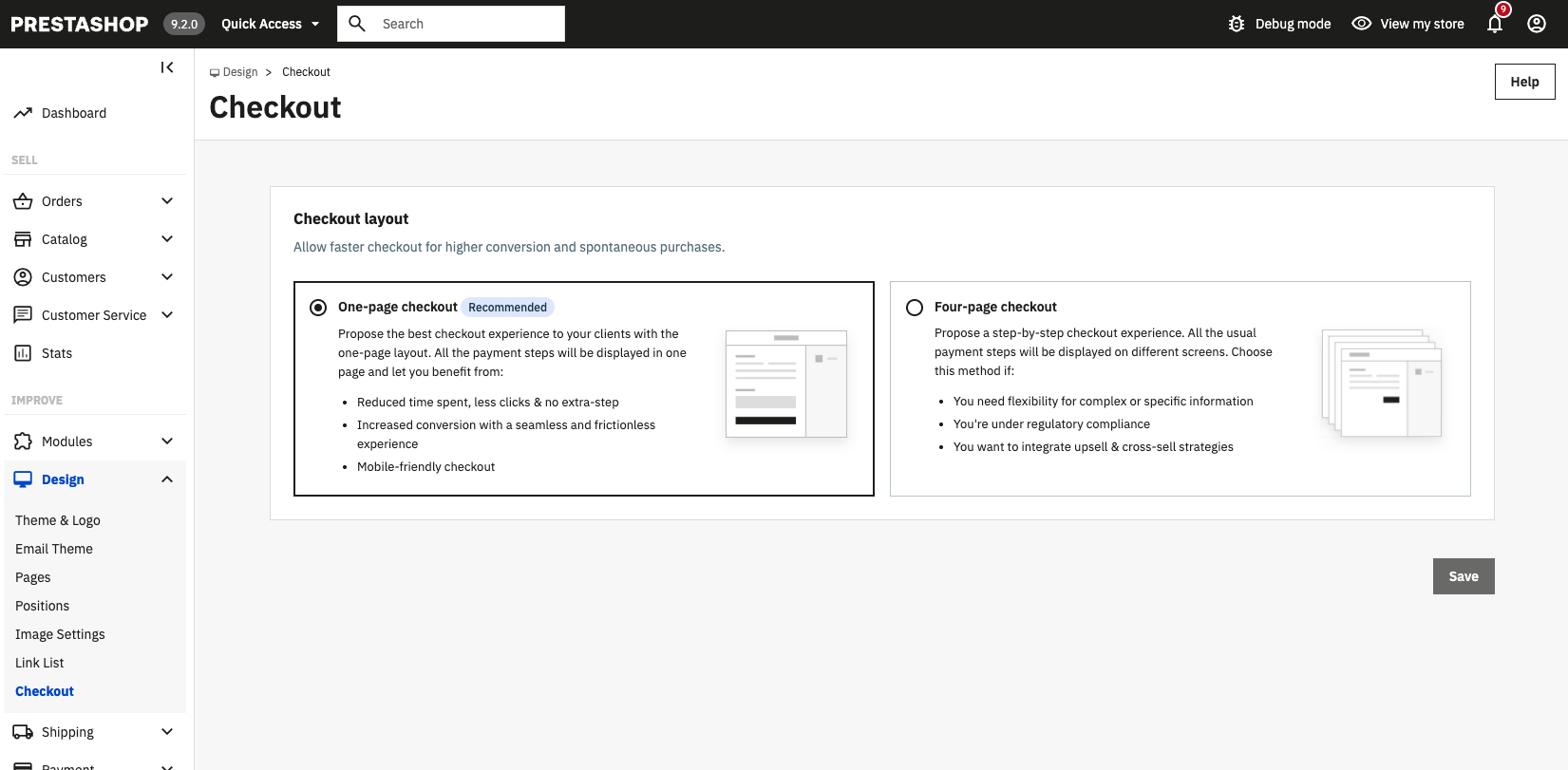 Switch between one-page and four-page checkout in the back office
Read the project discussion Read article
Payment and shipping module developers, this is for you
If you maintain a payment or shipping (carrier) module, please review the checkout documentation to make sure your solution behaves correctly in the one-page flow: the module developers guide and the theme developers guide.Extra Properties - native extra fields for every entity
Extensibility has always been a key principle in PrestaShop, and the platform already gives modules plenty of room to enrich it through hooks, including ones that let you adjust Symfony form builders, grids, and more. Storing additional data on a core entity, however, has been more involved: adding extra fields to a Product, Customer, Order, or any other entity usually meant creating your own tables, wiring up the relations by hand, and repeating that same persistence logic in every module.
There are clean ways to do this today, but they ask each developer to rebuild the same plumbing every time. We’re simplifying that with 9.2 by introducing a new native system for extra properties.
PrestaShop 9.2 introduces Extra Properties: a new native way to attach extra fields to PrestaShop entities, with built-in support for multistore, multilang, Back Office forms and grids, Front Office access, and the Admin API.
- For module developers, this means less boilerplate and cleaner integrations.
- For the core, it creates a reusable extension point that can power future features consistently.
- And for merchants, it makes extra data easier to manage without sacrificing maintainability.
A module (or the core itself) can register a new field on any supported entity, such as a Product, Combination, Customer, or Order. Each field has its own type and rules, and it understands languages and shops out of the box.
Once registered, the field shows up everywhere automatically: in the Back Office forms and grids, on the Front Office, and in the Admin API. No overrides, no extra wiring.
Follow the development Read article
Ask AI - a native AI assistant in your back office
PrestaShop 9.2 introduces “Ask AI”, a built-in conversational assistant available right in the back office. Instead of clicking through menus, merchants can simply ask questions about their data and trigger actions using plain, natural language.
Under the hood, Ask AI is powered by the PrestaShop MCP Server (Model Context Protocol), which means you are not locked into a single vendor. You can connect your own AI provider, whether that is ChatGPT, Claude, Gemini, or another compatible model.
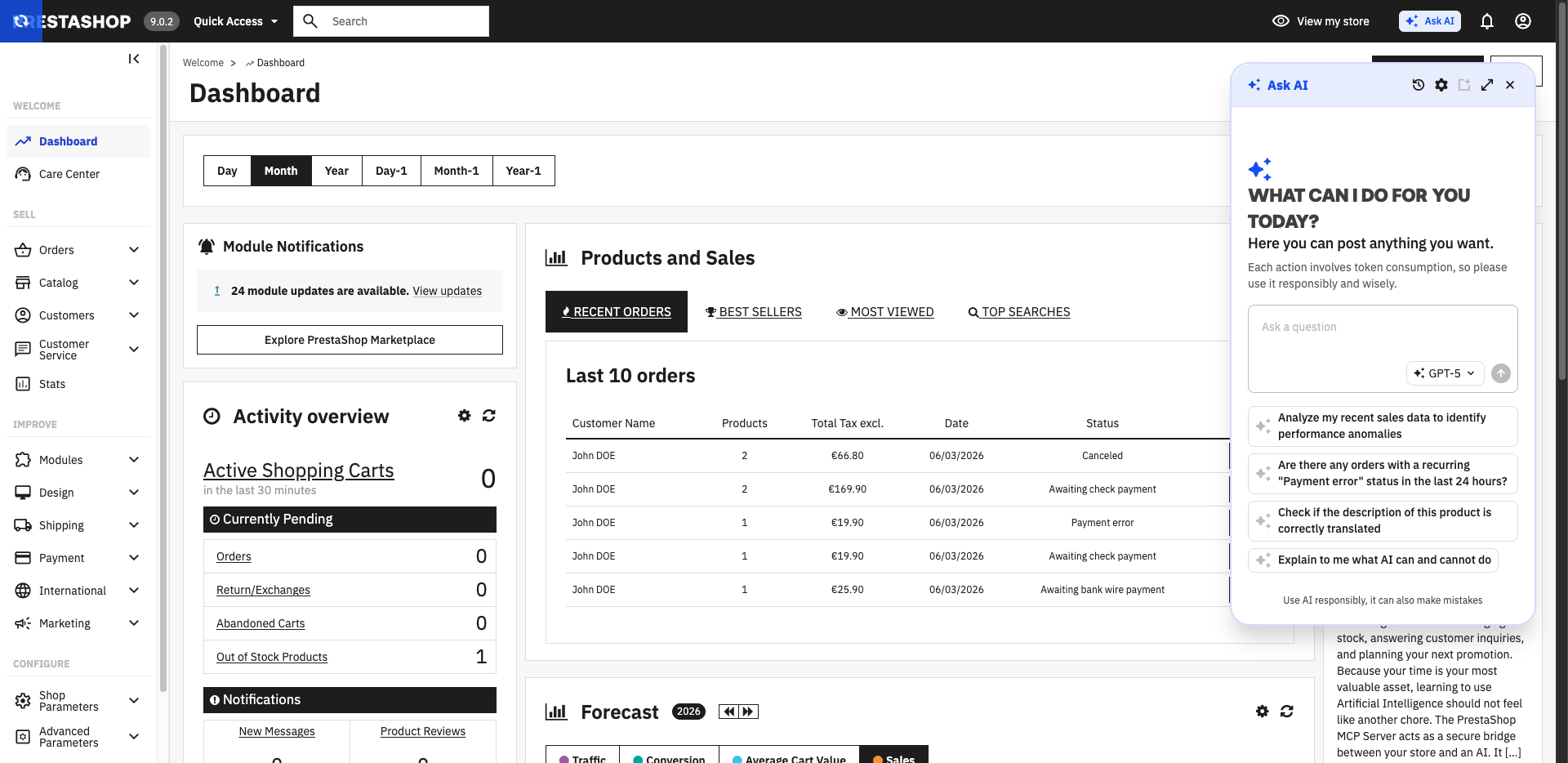 The Ask AI panel opens right inside the back office
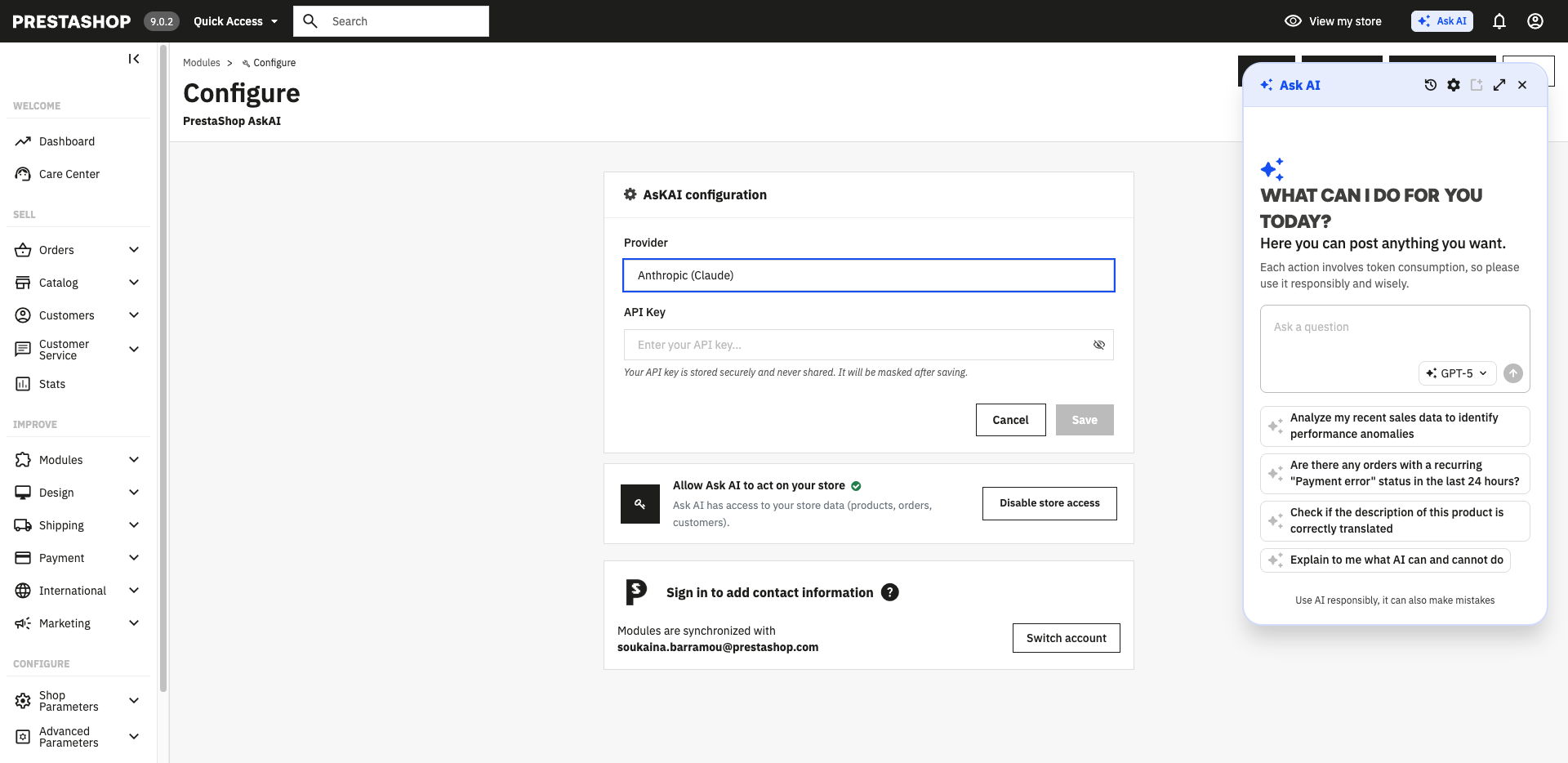 Pick your AI provider and connect your own API key
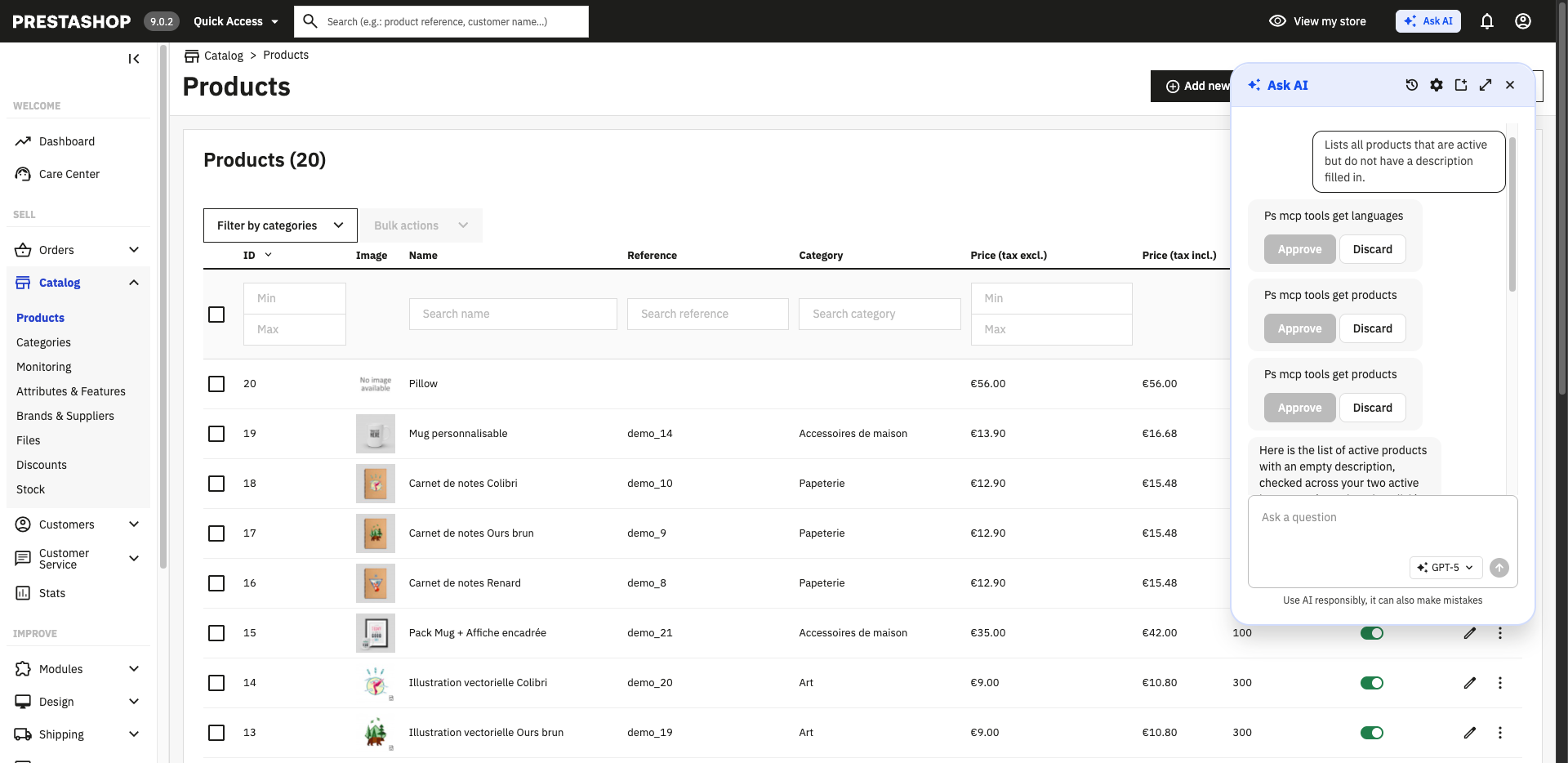 Ask AI asks for approval before acting on your store
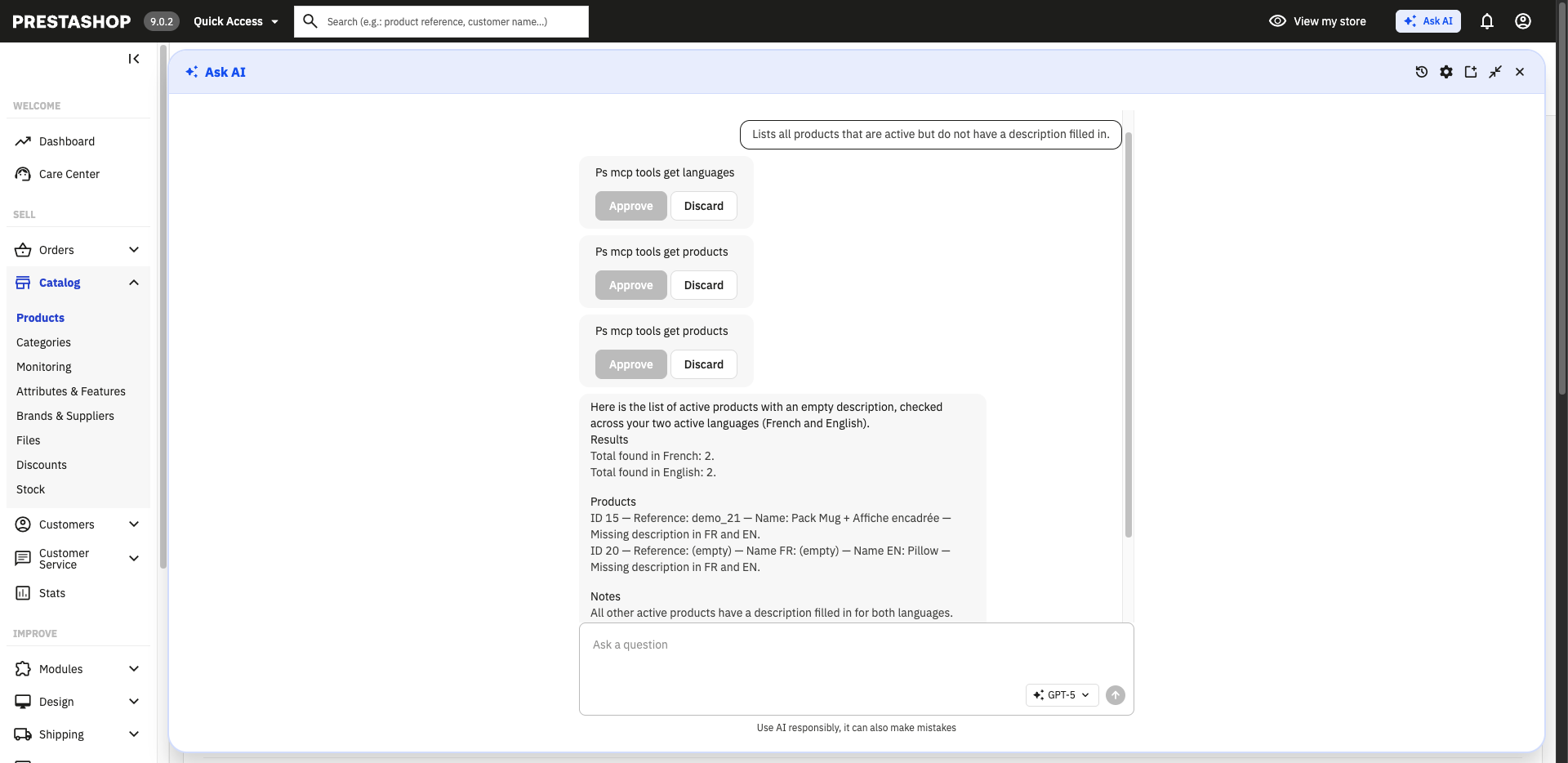 A full-screen conversation, answered from your real store data
Discover the PrestaShop MCP Server
PrestaShop Automation with Klaviyo - marketing automation, back in the box
PrestaShop Automation with Klaviyo is once again natively integrated into the PrestaShop Classic distribution. The module connects your store to Klaviyo, a marketing platform that lets merchants build automated email and SMS campaigns, segment their audience, and personalize customer communication based on real shop data and behavior.
By bundling it directly into Classic, merchants get a powerful marketing automation toolset available right after installation, with no separate module to hunt down.
The Symfony migration continues
A long-running effort behind PrestaShop 9 is the migration of the remaining legacy pages to the Symfony framework. This is not a flashy feature, but it matters: migrated pages are cleaner, easier to maintain and extend, and benefit from Symfony’s modern security and form handling.
With 9.2, another batch of pages has completed this migration and is now marked as stable. The following pages are ready for you to try:
- Countries
- Merchandise Return
- Hook a module
- Quick Access
- Email body translations
- Tax rules
These migrated pages are available behind a feature flag, so you can switch to the new version and let us know how it behaves before it becomes the default.
What is a feature flag?
A feature flag is a simple switch that turns a specific capability on or off in your shop. Some features and migrated pages ship disabled by default so you can opt in and test them before they become the standard. You will find these switches in the “New & Experimental Features” page, under the Advanced Parameters menu in your back office.What else is new in PrestaShop 9.2 Beta?
Of course, there are many other improvements and bug fixes in this release.
- Back Office:
- New feature:
- #41822: Add translation scanner for extra property labels and descriptions (by @jolelievre)
- #41775: Add Back Office management for extra property definitions (by @Jeremie-Kiwik)
- #41402: Rework shipping cost as service (by @Poulinhoo)
- #41015: Feat: some refactor + add row action to generate delivery slip (by @Nakahiru)
- #41012: Add shipments on edit modal (by @Poulinhoo)
- #40960: Handle shipment product quantity update (by @M0rgan01)
- #40944: Add a modal to improve shipments inside order page for editing a product (by @Poulinhoo)
- #40852: Add soft delete on multishipment (by @Poulinhoo)
- #40819: Add possibility to create a shipment on an existing order (by @Poulinhoo)
- #40685: EPIC1-US1.2 : B2B Model Activation : add “B2C mode” and “B2B mode” settings (by @soledis-contributeur)
- #40591: Feat(shipment): add shipments information on invoices (by @Nakahiru)
- Improvement:
- #41941: Rework the extra property definition form into structured builders (rows as form data, catalogs, save-time validation) (by @jolelievre)
- #41776: Change badge color for product quantity display (by @Maofree)
- #41770: Delivery slip multi shipment - remove Total amount paid (by @M0rgan01)
- #41729: UI Test - Add UI test to check the contribution part of the Wall of Fame (by @AureRita)
- #41712: Add delivery slip in documents tab (Improved shipment) (by @M0rgan01)
- #41623: Improve Tax rules management in Tax rules group backoffice pages (by @boherm)
- #41612: Replace window.prompt() with a modal when adding a page to Quick Access (by @mattgoud)
- #41588: Sort hook selector options alphabetically by name (by @nicosomb)
- #41559: Migrate “International > Taxes > Tax Rules” page (by @boherm)
- #41527: Migrate merchandise return (by @tleon)
- #41526: Add CLI console commands to change an employee password & create a super admin (by @jf-viguier)
- #41508: Migrate “Configure > Advanced Parameters > Quick Access” page to Symfony (by @mattgoud)
- #41495: Improve countries list Symfony migration (by @mattgoud)
- #41433: SF Migration - Email body translations (by @boherm)
- #41407: Migrate the Hook a module feature (by @nicosomb)
- #41406: Migrate country options (by @tleon)
- #41397: Country Address format: replace legacy widget with Vue 3 visual builder (by @jolelievre)
- #41081: Merge add shipment in existing command (by @Poulinhoo)
- #41050: Handle inelegible products “free gift” discount (by @nicosomb)
- #41026: Add form builder for edit shipment form (by @Poulinhoo)
- #40995: Disabled discount when only customer or customer group is deleted (by @tleon)
- #40918: Add GetShipmentsForOrderDetail query (by @M0rgan01)
- #40892: Discount UI improvement (by @jolelievre)
- #40850: Add builder form on add product inside a existing order (by @Poulinhoo)
- #40846: Update split and merge forms for multi-shipment (by @M0rgan01)
- #40719: Added multi-shipment support to emails (by @M0rgan01)
- #40548: Feat: add new modale on order page for add product & add select for choose shipment for new product added (by @Poulinhoo)
- #40514: Multi-carrier - Handle product deletion in order (by @M0rgan01)
- #40477: Add clickable product links in stock management pages (by @kpodemski)
- #40238: BO : Enabled feature flag “Tag” & Set stability as “stable” (by @Progi1984)
- #40234: Delete specific prices when group is removed (by @aomaxime)
- Bug fix:
- #41931: Add bulk delete action to migrated Countries page (by @jolelievre)
- #41923: Changing stock behaviour not working with multistore. (by @Prestaworks)
- #41909: Fix cumulated free shipping (by @tleon)
- #41819: Fix legacy module transaltion system (by @jolelievre)
- #41817: Fix: order-with-shipment-display (by @M0rgan01)
- #41769: Delivery slip multi shipment - Fix grid action download delivery slip (by @M0rgan01)
- #41763: Fix API Client creation error caused by non-int form handler result (by @jolelievre)
- #41745: Reject invalid call prefix when creating or editing a country (FF Country) (by @mattgoud)
- #41744: Reject duplicate ISO code when creating or editing a country (FF Country) (by @mattgoud)
- #41736: Fix custom feature value selection when no predefined values exist (by @Codencode)
- #41735: Fix feature values grid to exclude custom values (by @Codencode)
- #41732: Fill default address format when creating a country (FF Country) (by @mattgoud)
- #41727: Fix: Module Development and Distribution: Prestashop deletes automatically src/Entity/index.php, but it does not recursively in subfolders (by @Codencode)
- #41689: Handle only carrier compatible with products and active (by @Poulinhoo)
- #41675: Fix: HTMLPurifier through twig extension is not adhering to cache dir config (by @Codencode)
- #41661: Fix Quick Access form not auto-filling empty language names (by @mattgoud)
- #41651: Fix bad redirection for email body translations (by @boherm)
- #41620: Fix states grid not refreshing after toggle when filters are active (by @mattgoud)
- #41617: Fix countries grid not refreshing after toggle when filters are active (by @mattgoud)
- #41611: Cart rule compatibility search does not filter results for new cart rule (by @LaBisquerie)
- #41581: Add missing semicolon (by @mgielecinski)
- #41573: Fix highlight option missing in Discount V2 form (by @mattgoud)
- #41570: Use position as default sorting for feature grid (by @Codencode)
- #41566: Discount - Fix delivery condition not removed when switching to None (by @mattgoud)
- #41564: Fix Discount V2 end date validation when period never expires is checked (by @mattgoud)
- #41555: Make HookRegistry stateless and name-keyed (by @jolelievre)
- #41552: Fix #41189 - Allow changing discount status on edit page (by @mattgoud)
- #41551: Fix shop selector lists overflowing their container (by @david-prochazka)
- #41530: Shopping Carts : For combinations, if no image defined, use the cover image (by @Progi1984)
- #41524: Invoice : If no payments, display the payment method (by @Progi1984)
- #41457: Enhance invoice filename safety by sanitizing number (by @Maofree)
- #41394: Fix: [Multishop] Error when updating “Schema of URLs” for a single shop (by @Codencode)
- #41307: Fix PDF downloads using Symfony responses (by @Codencode)
- #41303: Fix address state selection after country states reload (by @Codencode)
- #41206: Bugfix: prevent email shortcodes automatically being moved. Fixes #38563 issue (by @aleksiuno)
- #41204: Change the redirection of combination button learn more (by @AureRita)
- #41116: Fix: align on the same line inline grid action and regular grid action (by @Nakahiru)
- #41036: Fix: Error 500 if I enter a space in a customer’s first or last name field (by @Codencode)
- #41007: Fix: CountryQueryBuilder::getCountQueryBuilder() always returns 1 instead of the true total (by @Codencode)
- #40999: Fix/40997 default currency import on shop copy (by @Codencode)
- #40898: Fix: Bug: reserved_quantity not updated when “Share available quantities for sale” is enabled (Multishop) (by @Codencode)
- #40874: Update eligible carriers calculation for multi-shipment (by @M0rgan01)
- #40872: Resolve problem on split shipment on carrier select (by @Poulinhoo)
- #40867: Hide expiration field when “period never expires” is checked (by @nicosomb)
- #40821: Resolve problem on add product on existing order when multishipment is disable (by @Poulinhoo)
- #40530: Multi-shipment - Fix split shipment carrier choice (by @M0rgan01)
- #40099: Fix: Cart rule combinations lost when saving if lazy-loaded list (jscroll) is not fully loaded (by @Codencode)
- Refactoring:
- #41260: TEST [E2E] update Design Pages page with meta title column (by @paulnoelcholot)
- New feature:
- Front Office:
- New feature:
- Improvement:
- #41974: Add autofill autocomplete tokens to the customer registration form (by @boo-code)
- #41709: Update password autocomplete (by @tblivet)
- #41404: Improvement: add back parameter in FO customer template URLs (by @ThbPS)
- #41281: Harden and depreciate /init.php for 9.1.x (by @jf-viguier)
- #40849: Login form: change
autocomplete="email"toautocomplete="username"(by @yannicka) - #40587: Multi-shipments - Added a compatibility layer for orders without shipments (by @M0rgan01)
- #40345: Fix(FO): Allow HEAD requests to be processed by canonicalRedirection … (by @tfayolle)
- #40315: Use product EmbeddedAttributes in quickview (by @M0rgan01)
- #40308: CMS pages listed on CMS Category page should be presented properly (by @Prestaworks)
- #39949: Refactor attachment download URLs to use SEO-friendly pattern /attachment/{id}-{filename} (by @Codencode)
- #33539: Secure table name with bqsql in DB and DBQuery (by @jf-viguier)
- Bug fix:
- #41899: Scope Image::getCover() to the shop (by @boo-code)
- #41711: Use new shipping calculator on order creation (Improved shipment) (by @M0rgan01)
- #41649: Add missing breadcrumb link to OrderDetailController (by @Codencode)
- #41590: Add missing breadcrumb link to CartController (by @Codencode)
- #41509: Avoid bad URL on invalid media with media servers enabled and CCC disabled (by @gross-nvs)
- #41299: Guard product page when product is null (by @Codencode)
- #41298: Fix: hook extra content issues with multi shipment (by @Nakahiru)
- Refactoring:
- #41994: Use canonical url in breadcrumbs, avoid using smarty value (by @Hlavtox)
- #41993: Further small tweaks to structured data (by @Hlavtox)
- #41811: Fix structured data for manufacturer list (by @Hlavtox)
- #41698: Round price in structured data to display precision (by @Hlavtox)
- #41006: Refacto: remove One-Page Checkout feature flag (by @ThbPS)
- #37552: Render structured data on core side (by @Hlavtox)
- Core:
- New feature:
- #41492: Fix matrix generation workflow (by @jolelievre)
- #41446: Add a console command to list modules: prestashop:module:list (by @jf-viguier)
- #41092: Add extra properties to PrestaShop (by @Jeremie-Kiwik)
- #41089: Integrate the price calculator in getPriceStatic and getProductProperties (by @jolelievre)
- #41039: Initialise new Product calculator (by @jolelievre)
- #41029: Define the architecture for the new extra property feature (by @jolelievre)
- #41027: Start defining the new pricing architecture (by @jolelievre)
- #40796: Add feature flag for One-page checkout (by @kevin-carangeot)
- #40764: Add manual workflow to generate and create a PR for changelog (by @jolelievre)
- #40755: Add build release action (by @nicosomb)
- #40654: Theme helper to check framework’s compatibility (by @kpodemski)
- #40031: Add new condition types (by @Hlavtox)
- Improvement:
- #42007: Update hooks configuration (by @nicosomb)
- #41989: Update dependencies for release (by @tleon)
- #41976: Update the generated FOS JS routing file (by @mattgoud)
- #41962: Chore(deps-dev): bump @typescript-eslint/eslint-plugin from 8.62.0 to 8.63.0 in /tests/UI (by @app/dependabot)
- #41893: Chore(deps-dev): bump @typescript-eslint/eslint-plugin from 8.61.1 to 8.62.0 in /tests/UI (by @app/dependabot)
- #41892: Chore(deps-dev): bump @types/node from 26.0.0 to 26.1.0 in /tests/UI (by @app/dependabot)
- #41891: Chore(deps-dev): bump @typescript-eslint/parser from 8.62.0 to 8.62.1 in /tests/UI (by @app/dependabot)
- #41883: Update Symfony components after 6.4.42 release (by @nicosomb)
- #41806: Replace legacy extra-property validation with Symfony Validator constraints (by @jolelievre)
- #41800: Bump GitHub Actions to Node 24 runtime (by @PrestaEdit)
- #41787: Chore(deps-dev): bump @types/node from 25.9.3 to 26.0.0 in /tests/UI (by @app/dependabot)
- #41786: Chore(deps): bump @faker-js/faker from 10.4.0 to 10.5.0 in /tests/UI (by @app/dependabot)
- #41785: Chore(deps-dev): bump @typescript-eslint/parser from 8.61.0 to 8.61.1 in /tests/UI (by @app/dependabot)
- #41784: Chore(deps-dev): bump @typescript-eslint/eslint-plugin from 8.61.0 to 8.61.1 in /tests/UI (by @app/dependabot)
- #41746: Add ExtraProperty AI component context (by @jolelievre)
- #41728: Document ReorderPositionsButtonType convention for position columns (by @jolelievre)
- #41719: Chore(deps-dev): bump @typescript-eslint/eslint-plugin from 8.60.1 to 8.61.0 in /tests/UI (by @app/dependabot)
- #41717: Chore(deps-dev): bump @types/node from 25.9.2 to 25.9.3 in /tests/UI (by @app/dependabot)
- #41715: Chore(deps): bump @prestashop-core/ui-testing from
ae553f7to0db9b72in /tests/UI (by @app/dependabot) - #41657: Chore(deps): bump mysql2 from 3.22.4 to 3.22.5 in /tests/UI (by @app/dependabot)
- #41656: Chore(deps-dev): bump @types/node from 25.9.1 to 25.9.2 in /tests/UI (by @app/dependabot)
- #41655: Chore(deps-dev): bump @typescript-eslint/parser from 8.60.0 to 8.60.1 in /tests/UI (by @app/dependabot)
- #41654: Chore(deps-dev): bump @typescript-eslint/eslint-plugin from 8.60.0 to 8.60.1 in /tests/UI (by @app/dependabot)
- #41653: Chore(deps): bump @prestashop-core/ui-testing from
117cd6fto64fb21cin /tests/UI (by @app/dependabot) - #41647: Bump version 9.1.5 (by @jolelievre)
- #41607: Workflow dispatch to create the build branch (by @jolelievre)
- #41582: Chore(deps): bump @prestashop-core/ui-testing from
c66894dtof036af5in /tests/UI (by @app/dependabot) - #41567: Update Symfony components after 6.4.41 release (by @nicosomb)
- #41561: Update Symfony components after 6.4.41 release (by @nicosomb)
- #41537: Chore(deps): bump mocha from 11.7.5 to 11.7.6 in /tests/UI (by @app/dependabot)
- #41536: Chore(deps-dev): bump @types/node from 25.8.0 to 25.9.1 in /tests/UI (by @app/dependabot)
- #41534: Chore(deps-dev): bump @typescript-eslint/eslint-plugin from 8.59.3 to 8.59.4 in /tests/UI (by @app/dependabot)
- #41529: Set version to 9.1.4 (by @Progi1984)
- #41491: Chore(deps-dev): bump @typescript-eslint/eslint-plugin from 8.59.2 to 8.59.3 in /tests/UI (by @app/dependabot)
- #41490: Chore(deps-dev): bump @types/chai from 4.3.11 to 5.2.3 in /tests/UI (by @app/dependabot)
- #41489: Chore(deps-dev): bump @types/node from 25.6.2 to 25.8.0 in /tests/UI (by @app/dependabot)
- #41465: Update Symfony components after 6.4.39 release (by @nicosomb)
- #41455: Improve AI Forms context (settings vs CRUD) and introduce the sub-context pattern (by @jolelievre)
- #41449: Make branch input a simple input to use build branches (by @jolelievre)
- #41440: Chore(deps-dev): bump @types/node from 25.6.0 to 25.6.2 in /tests/UI (by @app/dependabot)
- #41439: Chore(deps): bump chai from 4.5.0 to 6.2.2 in /tests/UI (by @app/dependabot)
- #41435: Add getHighestPosition alias (by @PrestaEdit)
- #41390: Chore(deps-dev): bump @typescript-eslint/eslint-plugin from 8.59.0 to 8.59.1 in /tests/UI (by @app/dependabot)
- #41339: Chore(deps-dev): bump @typescript-eslint/eslint-plugin from 8.58.0 to 8.59.0 in /tests/UI (by @app/dependabot)
- #41338: Chore(deps): bump mysql2 from 3.20.0 to 3.22.3 in /tests/UI (by @app/dependabot)
- #41337: Chore(deps-dev): bump @typescript-eslint/parser from 8.58.0 to 8.59.0 in /tests/UI (by @app/dependabot)
- #41336: Improves stale issues workflow : increases cron interval to 20 minutes and adjusts the GitHub API operations limit to 1000. (by @cnavarro-prestashop)
- #41305: Improve Connection::isBot() with modern crawlers and AI bots to prevent ghost carts and fake connections (by @jf-viguier)
- #41296: Chore(deps-dev): bump typescript from 5.9.3 to 6.0.3 in /tests/UI (by @app/dependabot)
- #41279: Create a skill for symfony migration in prestashop (by @tleon)
- #41277: Ai fine tunes, update readme and release builder (by @jolelievre)
- #41229: Bump the version of the prestashop/dashgoals package from v2.0.4 to v2.0.5 (by @cnavarro-prestashop)
- #41227: Remove 9.0.x branch (by @Progi1984)
- #41222: Chore(deps): bump @prestashop-core/ui-testing from
05ecd00to4ed7dbcin /tests/UI (by @app/dependabot) - #41221: Chore(deps-dev): bump @typescript-eslint/eslint-plugin from 8.57.2 to 8.58.0 in /tests/UI (by @app/dependabot)
- #41220: Chore(deps-dev): bump @typescript-eslint/parser from 8.57.2 to 8.58.0 in /tests/UI (by @app/dependabot)
- #41219: Chore(deps): bump dotenv from 17.3.1 to 17.4.1 in /tests/UI (by @app/dependabot)
- #41138: Mark Upgrader class as deprecated (by @ga-devfront)
- #41134: Chore(deps-dev): bump @typescript-eslint/parser from 8.57.1 to 8.57.2 in /tests/UI (by @app/dependabot)
- #41133: Chore(deps): bump @faker-js/faker from 10.3.0 to 10.4.0 in /tests/UI (by @app/dependabot)
- #41132: Chore(deps-dev): bump @typescript-eslint/eslint-plugin from 8.57.1 to 8.57.2 in /tests/UI (by @app/dependabot)
- #41095: Init CartCalculator for pricing v2 (by @boherm)
- #41044: Chore(deps-dev): bump @typescript-eslint/parser from 8.57.0 to 8.57.1 in /tests/UI (by @app/dependabot)
- #41043: Chore(deps-dev): bump @typescript-eslint/eslint-plugin from 8.57.0 to 8.57.1 in /tests/UI (by @app/dependabot)
- #41032: Add new pricing feature flag (by @boherm)
- #40984: Chore(deps-dev): bump @typescript-eslint/parser from 8.56.1 to 8.57.0 in /tests/UI (by @app/dependabot)
- #40983: Chore(deps-dev): bump @typescript-eslint/eslint-plugin from 8.56.1 to 8.57.0 in /tests/UI (by @app/dependabot)
- #40982: Chore(deps): bump mysql2 from 3.19.1 to 3.20.0 in /tests/UI (by @app/dependabot)
- #40943: Chore(deps): bump mysql2 from 3.18.2 to 3.19.0 in /tests/UI (by @app/dependabot)
- #40908: Chore(deps-dev): bump @typescript-eslint/eslint-plugin from 8.56.0 to 8.56.1 in /tests/UI (by @app/dependabot)
- #40907: Chore(deps): bump @prestashop-core/ui-testing from
4d24c01tobc1cc93in /tests/UI (by @app/dependabot) - #40868: Move B2B entities into B2B namespace (by @soledis-contributeur)
- #40858: Chore(deps): bump mysql2 from 3.17.1 to 3.17.4 in /tests/UI (by @app/dependabot)
- #40830: Introduce CartRule::total_quantity property (by @jolelievre)
- #40788: Use the action from master official branch (by @jolelievre)
- #40786: Add display for changelog generation parameters (by @jolelievre)
- #40784: Use provided branch by default when generating the changelog (by @jolelievre)
- #40783: Bump to 9.2.0 (by @Progi1984)
- #40782: Chore(deps): bump @prestashop-core/ui-testing from
dd7a727to1e50a1cin /tests/UI (by @app/dependabot) - #40781: Chore(deps-dev): bump @typescript-eslint/eslint-plugin from 8.54.0 to 8.55.0 in /tests/UI (by @app/dependabot)
- #40779: Chore(deps): bump dotenv from 17.2.4 to 17.3.1 in /tests/UI (by @app/dependabot)
- #40778: Chore(deps-dev): bump @typescript-eslint/parser from 8.54.0 to 8.55.0 in /tests/UI (by @app/dependabot)
- #40769: Add missing name for matrix workflow (by @jolelievre)
- #40753: Dynamic PHP matrix in workflows (by @jolelievre)
- #40749: Integrate header-stamp in CI (by @jolelievre)
- #40729: Refacto workflow for release (by @tleon)
- #40637: CI: Add PR convention validator (fixes #40501) (by @mattgoud)
- #40623: Update PULL_REQUEST_TEMPLATE.md (by @Touxten)
- #40316: Add
9.1.xbranch for github workflows (by @boherm) - #39664: Allow modules to use services.php and version-specific services.yml files to handle new Symfony services/changes/renames while preserving older versions compatibility (by @prestamodule)
- #39576: Add console command “prestashop:htaccess:generate” (by @nicohery)
- Bug fix:
- #41988: Update translationtools-bundle (by @jolelievre)
- #41842: Fix: Update cache directory handling in HTMLPurifier constructor (by @Progi1984)
- #41828: Fix: Update cache directory handling in HTMLPurifier constructor (by @cnavarro-prestashop)
- #41808: Fix meta title appended to CMS page, CMS category, manufacturer, and supplier URLs (by @Codencode)
- #41790: Guard order message name-uniqueness check on partial edit (by @PrestaEdit)
- #41773: Update phpstan exclusion pattern from release creator and add unit tests (by @cnavarro-prestashop)
- #41761: Fix Hummingbird development files included in release package (by @Codencode)
- #41760: Fix image-types list endpoint returning 405 by making grid data facto… (by @axel-paillaud)
- #41750: Prevent empty ean13 into product URL (by @hadjedjvincent)
- #41708: Fix states lookup using row indexes instead of country IDs (by @paulschwahn)
- #41628: Align MySQL session time zone with the shop time zone on each connection (by @mattgoud)
- #41626: Fix multilang fallback for fields using isRequiredWhenActive and defaultLanguageRequiredWhenActive validators (by @guillaume60240)
- #41431: Backport #41356 : Add CartId into product search handler when employeeId not provided (by @Progi1984)
- #41416: Build Creator : Filter only Copilot Instructions and not all workflows (by @Progi1984)
- #41386: Fix route management and comment Dispatcher (by @Hlavtox)
- #41356: Add CartId into product search handler when employeeId not provided (by @boherm)
- #41273: Fix: cast bool field in get cms page category for editing handler (by @axel-paillaud)
- #41225: Fix attribute and attribute group position ordering in core methods (by @nicohery)
- #41130: Fix: guard against null employee in associateWithShops() (by @axel-paillaud)
- #40822: Update OrderShipmentService header (by @M0rgan01)
- #40818: Fix old license headers (by @jolelievre)
- #40813: Fix Changelog PR description (by @boherm)
- #40797: Add right to pr validate metadata workflow (by @tleon)
- #40785: Fix changelog workflow (by @jolelievre)
- #40772: Fix url to the forked generation workflow (by @jolelievre)
- #40771: Fix url to the forked generation workflow (by @jolelievre)
- #40759: Replace github action that sets up mysql in CI (by @jolelievre)
- #40752: Fix the workflow to use the shared action in steps, not as a workflow (by @jolelievre)
- #40744: Fix translation catalogue filename corruption during export (by @aeyoll)
- #40424: Fixed inconsistancy use of variable in CartRule.php (by @pjouglet)
- #40297: Multi-carrier - handle product customization (by @M0rgan01)
- #39837: Change matching method in ShopContextSubscriber (by @djbuch)
- #36781: Fix category shop association (by @PululuK)
- Refactoring:
- #41967: Rename ExtraPropertyDefinition formFieldType to formType (by @jolelievre)
- #41579: Fix some deprecations (by @Hlavtox)
- New feature:
- Installer:
- New feature:
- #41028: EPIC2-US2.1 :Business Entity Management (Back Office) – New “Business Entities” menu entry (by @soledis-contributeur)
- #40632: B2B Contribution - EPIC 1-US1.1 : Data model foundation in the PrestaShop Core (by @soledis-contributeur)
- Improvement:
- #42010: Update default catalog build-920-beta1 (by @ps-jarvis)
- #42003: Update default catalog develop (by @ps-jarvis)
- #41995: Fix sync localization files (by @kpodemski)
- #41695: Automatically remove install/ folder after a successful installation (by @jf-viguier)
- #41354: Amend B2B data model to align with revised hybrid-mode schema (by @soledis-contributeur)
- #41205: Base of ai structure and contexts (by @tleon)
- #41200: B2B Contribution - Add “label” column & remove enterprise_id column to BusinessIdentifier entity (by @soledis-contributeur)
- #40891: B2B Contribution - Add “default” flag to business entity address (by @soledis-contributeur)
- #40224: B2B Contribution - EPIC 0-US0: Creation of the “improved_b2b feature” feature flag (by @soledis-contributeur)
- Bug fix:
- #41556: Merge set-pr-milestone into validate-pr-metadata to fix ordering and rerun staleness (by @jolelievre)
- #41226: Revert “Fix: align on the same line inline grid action and regular grid action” (by @ga-devfront)
- #41147: Fix admin URL construction in Install.php (by @PrestaEdit)
- #40727: Chore(deps): bump mysql2 from 3.16.2 to 3.16.3 in /tests/UI (by @app/dependabot)
- #40725: Chore(deps): bump @faker-js/faker from 10.2.0 to 10.3.0 in /tests/UI (by @app/dependabot)
- #40724: Chore(deps): bump dotenv from 17.2.3 to 17.2.4 in /tests/UI (by @app/dependabot)
- #40723: Chore(deps): bump @prestashop-core/ui-testing from
6d9e330tod387516in /tests/UI (by @app/dependabot) - #40665: Chore(deps-dev): bump @typescript-eslint/eslint-plugin from 8.53.1 to 8.54.0 in /tests/UI (by @app/dependabot)
- #40664: Chore(deps): bump mysql2 from 3.15.3 to 3.16.2 in /tests/UI (by @app/dependabot)
- #40602: Chore(deps-dev): bump @typescript-eslint/parser from 8.53.0 to 8.53.1 in /tests/UI (by @app/dependabot)
- #40601: Chore(deps-dev): bump eslint-plugin-html from 8.1.3 to 8.1.4 in /tests/UI (by @app/dependabot)
- #40599: Chore(deps-dev): bump @typescript-eslint/eslint-plugin from 8.53.0 to 8.53.1 in /tests/UI (by @app/dependabot)
- #40543: Chore(deps-dev): bump @typescript-eslint/eslint-plugin from 8.52.0 to 8.53.0 in /tests/UI (by @app/dependabot)
- #40542: Chore(deps-dev): bump @typescript-eslint/parser from 8.52.0 to 8.53.0 in /tests/UI (by @app/dependabot)
- #40491: Chore(deps-dev): bump @typescript-eslint/eslint-plugin from 8.50.1 to 8.52.0 in /tests/UI (by @app/dependabot)
- #40447: Chore(deps): bump @faker-js/faker from 10.1.0 to 10.2.0 in /tests/UI (by @app/dependabot)
- #40416: Chore(deps-dev): bump @typescript-eslint/parser from 8.50.0 to 8.50.1 in /tests/UI (by @app/dependabot)
- #40415: Chore(deps-dev): bump @typescript-eslint/eslint-plugin from 8.50.0 to 8.50.1 in /tests/UI (by @app/dependabot)
- #40392: Chore(deps-dev): bump @typescript-eslint/eslint-plugin from 8.49.0 to 8.50.0 in /tests/UI (by @app/dependabot)
- #40391: Chore(deps-dev): bump @typescript-eslint/parser from 8.49.0 to 8.50.0 in /tests/UI (by @app/dependabot)
- #40327: Chore(deps): bump @prestashop-core/ui-testing from
38210fato133f785in /tests/UI (by @app/dependabot) - #40326: Chore(deps-dev): bump @typescript-eslint/eslint-plugin from 8.48.1 to 8.49.0 in /tests/UI (by @app/dependabot)
- #40325: Chore(deps-dev): bump @typescript-eslint/parser from 8.48.1 to 8.49.0 in /tests/UI (by @app/dependabot)
- New feature:
- Web Services:
- New feature:
- #41749: Add Extra Properties integration to the Admin API (by @jolelievre)
- Improvement:
- #41701: Display an input to upload files on Admin API OpenAPI interface (by @Quetzacoalt91)
- Bug fix:
- #34286: Fix field new not displayed on GET from API (by @Prestaworks)
- New feature:
- Localization:
- New feature:
- #41991: Sync localization files with LocalizationFiles repo (by @kpodemski)
- Improvement:
- #41997: Protect localization packs action (by @kpodemski)
- #41996: Sync localization packs from LocalizationFiles (by @ps-jarvis)
- Bug fix:
- New feature:
- Tests:
- New feature:
- Improvement:
- #41827: Test UI hummingbird v2.x (by @tblivet)
- #41821: Functional Tests : Improved Resiliency of WS Tests (by @Progi1984)
- #41816: Functional Tests : Bump @prestashop-core/ui-testing (by @Progi1984)
- #41810: Functional Tests : Bump @prestashop-core/ui-testing (by @Progi1984)
- #41805: Functional Tests : Fixed after #41570 (by @Progi1984)
- #41788: Functional Tests : Improved for Klavyio (by @Progi1984)
- #41780: Functional Tests : Improved for Klavyio (by @Progi1984)
- #41778: Add UI test for Quick Access modal empty-name validation (by @mattgoud)
- #41777: Functional Tests : Enable Feature Flag “Tax rule groups” (by @Progi1984)
- #41747: Functional Tests : Bump @prestashop-core/ui-testing (by @Progi1984)
- #41737: Functional Tests : Bump @prestashop-core/ui-testing (by @Progi1984)
- #41662: Merchandaise return ui tests (by @tleon)
- #41659: Functional Tests : Bump @prestashop-core/ui-testing (by @Progi1984)
- #41630: Functional Tests : Enable feature flag “Quick access” (by @Progi1984)
- #41627: Functional Tests : Enable Feature Flag “Email body translations” (by @Progi1984)
- #41594: Functional Tests : Enable Feature Flag Country (by @Progi1984)
- #41584: Functional Tests : API : POST /admin-api/discounts (Fixed after #41189) (by @Progi1984)
- #41546: Merchandise Returns : Cancel returns if the order return state is cancellable (by @Progi1984)
- #41539: Functional Tests : API : GET /admin-api/discounts (by @Progi1984)
- #41528: Functional Tests : API : DELETE /admin-api/discounts/{discountId} (by @Progi1984)
- #41518: Functional Tests : Bump @prestashop-core/ui-testing (by @Progi1984)
- #41514: Functional Tests : Remove
@todo#41241 (by @Progi1984) - #41503: Functional Tests : Bump @prestashop-core/ui-testing (by @Progi1984)
- #41476: Functional Tests : Remove numbering in endpoints directoriess (by @Progi1984)
- #41475: Functional Tests : @prestashop-core/ui-testing (by @Progi1984)
- #41462: Functional Tests : @prestashop-core/ui-testing (by @Progi1984)
- #41430: Functional Tests : Sync Title with JIRA (by @Progi1984)
- #41202: Functional Tests : API : POST /admin-api/discounts (by @Progi1984)
- #41112: Functional Tests : API : GET /discount-types (by @Progi1984)
- #41060: Functional Tests : BO - Discount - Minimum purchase amount (On Free shipping) (by @Progi1984)
- #41055: Add UI test for theme/logo > see all theme’s modules button (by @nicosomb)
- #40973: Nightly : Change hour of start (by @Progi1984)
- #40566: Nightly : Remove 8.0 & 8.1 (by @Progi1984)
- Bug fix:
- #41980: Pin maildev image to a stable tag in behaviour tests workflow (by @mattgoud)
- #41755: Fix flaky quick access filter UI test (multi-tab) (by @mattgoud)
- #41560: Functional Tests : Fixed WS - Products : CRUD (by @Progi1984)
- #40895: Nightly : Added PS_VERSION environment variable (by @Progi1984)
- #40384: Fix: SQL syntax for table checksum query (fixes #40383) (by @the-ge)
- Refactoring:
- #41765: TEST-12644 - Add test create guest from new order page (by @paulnoelcholot)
- #41739: TEST-749 - Add order message check to createSimpleOrderInBO test (by @paulnoelcholot)
- #41686: TEST-12861 & TEST-12862 - Functional Tests : BO - Wall of Fame - Top Contributors & New Contributors (by @paulnoelcholot)
- #41641: TEST-12860 - Add UI test for BO - Wall of Fame (by @paulnoelcholot)
- #41631: Adapt UI tests for Hook a module migration (by @nicosomb)
- #41456: Functional Tests : Fixed “API : GET /products/search” (by @Progi1984)
- #41415: Functional tests : WS - CRUD category (by @nesrineabdmouleh)
- #41306: Functional tests : BO - Catalog price rules - CRUD - Price(tax excl.) (by @nesrineabdmouleh)
- #41282: Functional tests : Add new test to CRUD catalog price rules with different groups (by @nesrineabdmouleh)
- #41242: Functional tests - Add new test to CRUD country in catalog price rules (by @nesrineabdmouleh)
- #41207: Functional tests : BO - Discount - Create a discount that applies automatically or via promo code (by @nesrineabdmouleh)
- #41153: Functional tests : BO - Discount - Trigger based on the total quantity of products in the cart (by @nesrineabdmouleh)
- #41150: Functional tests : BO - Discount - Check period (by @nesrineabdmouleh)
- #41056: Functional tests - Add new UI test to check free gift in discount V2 page (by @nesrineabdmouleh)
- #41031: Functional tests - Refacto discount V2 > Minimum purchase amount (by @nesrineabdmouleh)
- #40957: Functional tests - Add some check to BO - Orders - Multicarrier (by @nesrineabdmouleh)
- #40812: Functional tests - Delete the UI test to check shipping cost in FO > order details page (by @nesrineabdmouleh)
- #40739: Nightly : Clean the workflow (by @Progi1984)
- #40584: Functional tests : Add UI tests to check multicarrier on FO (Hummingbird & classic) (by @nesrineabdmouleh)
- #37161: Functional tests - Migrate link list pages to ui-testing-library and refacto CRUD linkList (by @nesrineabdmouleh)
Adapt your solutions to PrestaShop 9.2
If you develop modules, themes, or custom integrations for PrestaShop, we recommend reviewing the notable changes introduced in this version. The documentation covers breaking changes, deprecated components, and updated best practices that may affect your solutions. Testing against this beta now is the best way to be ready for the stable release.
Review notable changes in PrestaShop 9.2
How to test PrestaShop 9.2
You can download a fully featured PrestaShop 9.2 Classic Beta 1 package from here. This version includes the PrestaShop 9.2 core, additional modules from PrestaShop SA compatible with this version, and integration with the PrestaShop Marketplace.
Download PrestaShop 9.2 Beta 1
Known limitations
About upgrades
Once you install this beta, you will not be able to update to the Release Candidate or the final stable version through the Update Assistant module’s standard channel. You can, however, test the upgrade process itself using the Update Assistant’s local archive option. For real testing, we recommend a fresh installation.Your feedback is essential!
We are focusing on stabilizing 9.2. You can help by testing this beta version and reporting regressions early so we can fix them before the final release.
How you can help
- Install PrestaShop 9.2 Beta in a test environment.
- Try the One Page Checkout module, the Ask AI assistant, and the new Extra Properties system.
- Enable the relevant feature flags to test the newly migrated pages and experimental capabilities.
- Read the articles linked above to better understand the new features and start testing.
- Report issues if you find any and share the feedback as early as possible.
When you find a problem, please file a clear bug report on GitHub. Mention you tested the 9.2.0-beta.1 version and include steps to reproduce, environment details, and logs where applicable.
If you are a developer, you can also submit a pull request to fix bugs.
We encourage you to share your feedback in the dedicated GitHub discussion or on Slack.
Thank you to our contributors
A huge thank you to everyone who contributed to this release! Your dedication helps make PrestaShop stronger, more secure, and better for everyone. We truly appreciate your time and expertise.
Want to join the movement? Start contributing today and help shape the future of open source e-commerce!
 aeyoll
 aleksiuno
 aomaxime
 AureRita
 axel-paillaud
 boherm
 boo-code
 cnavarro-prestashop
 Codencode
 david-prochazka
 djbuch
 ga-devfront
 gross-nvs
 guillaume60240
 hadjedjvincent
 Hlavtox
 Jeremie-Kiwik
 jf-viguier
 jolelievre
 kevin-carangeot
 kpodemski
 LaBisquerie
 M0rgan01
 Maofree
 mattgoud
 matthieu-rolland
 mgielecinski
 Nakahiru
 nesrineabdmouleh
 nicohery
 nicosomb
 paulnoelcholot
 paulschwahn
 pjouglet
 Poulinhoo
 PrestaEdit
 prestamodule
 Prestaworks
 Progi1984
 PululuK
 Quetzacoalt91
 soledis-contributeur
 tblivet
 tfayolle
 ThbPS
ThbPS
 the-ge
 tleon
tleon
 Touxten
 tswfi
tswfi
 yannicka
PrestaShop 9.2 - What’s next?
Every version is the result of major contributions from our entire ecosystem, including our PrestaShop Experts. Stay tuned for the announcement of the 9.2 release.
Right now, we are focusing on stabilizing the beta version based on your feedback.