
PrestaShop 9.1 is available
Hummingbird 2.0 becomes the default theme, bringing modern architecture, performance, and EAA accessibility compliance.
PrestaShop 9.1 is now available for download. The headline of this release is Hummingbird 2.0, which becomes the default front office theme, delivering a modern, accessible, and high-performance storefront out of the box. This version also introduces two experimental features (multi-carrier shipping and a redesigned discount system), along with dozens of improvements and bug fixes.

Download & upgrade instructions
Hummingbird 2.0: the new default theme
The biggest change in PrestaShop 9.1 is that Hummingbird 2.0 is now the default front office theme. After months of development and community feedback since the beta, Hummingbird replaces Classic as the theme every new PrestaShop 9.1 installation ships with.

Built for accessibility
With the European Accessibility Act (EAA) taking effect in June 2025, accessibility is no longer optional for online stores in the EU. Hummingbird 2.0 achieves over 95% compliance with the EAA requirements, giving merchants a strong head start toward meeting their obligations. Semantic HTML, proper ARIA attributes, keyboard navigation, and sufficient color contrast are built into the theme from the ground up.
Modern architecture for developers
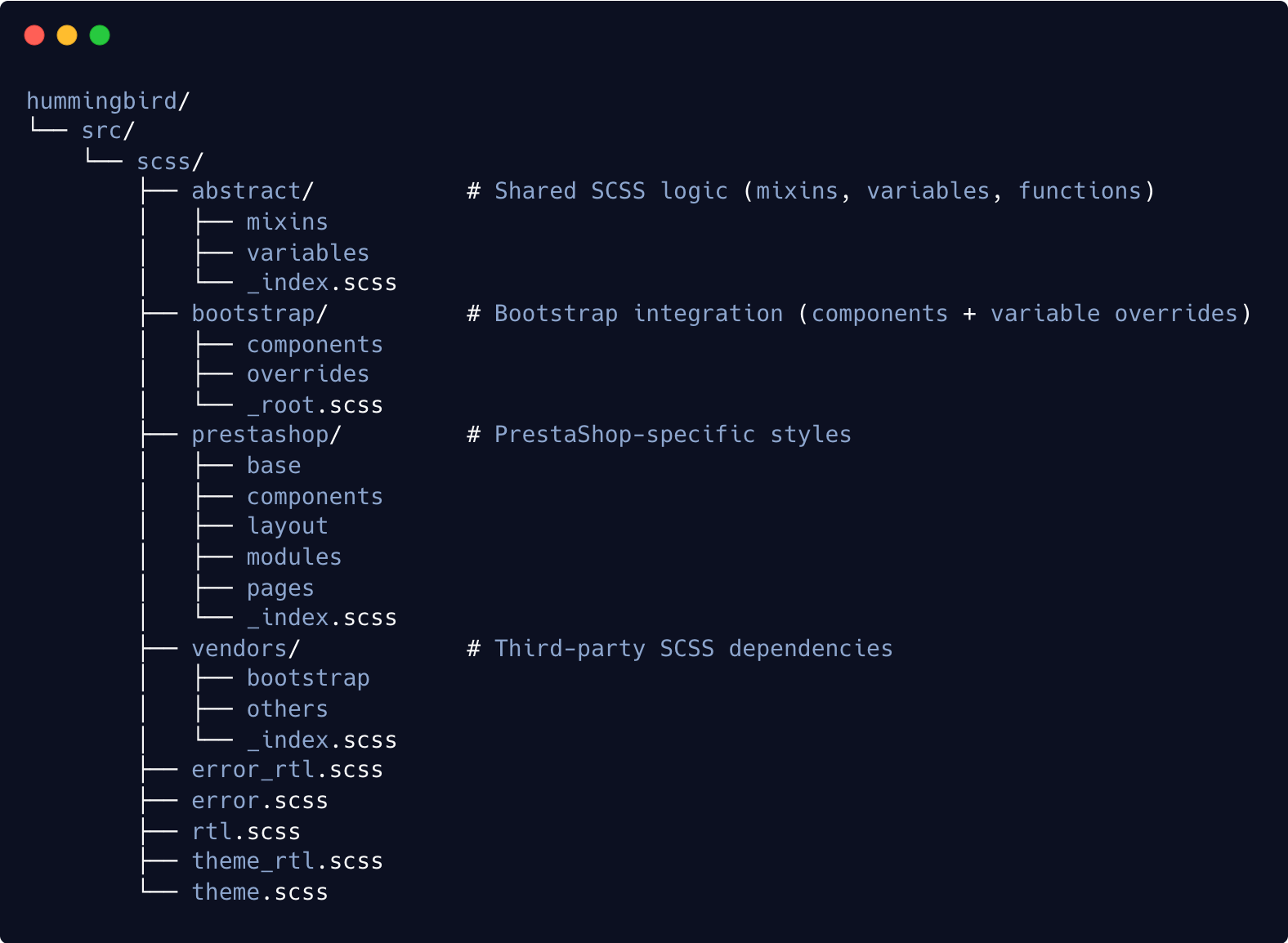
Hummingbird 2.0 is a complete rebuild, not an incremental update to Classic. It brings:
- Bootstrap 5 with LTS support for modern, consistent design components.
- BEM-based CSS naming for easier maintenance and clearer structure.
- SCSS architecture based on CSS
@layer, enabling modular and scalable styling. - A reorganized directory structure that moves away from the legacy
_devlayout. - Reduced third-party dependencies, favoring Bootstrap’s built-in components.
- Clear separation between Bootstrap and PrestaShop-specific styles, simplifying custom overrides.
- Native support for Bootstrap dark mode, which can be enabled via an SCSS variable.
Architecture deep dive Release notes Discussions & feedback
Experimental features
PrestaShop 9.1 also ships with two experimental features, available behind feature flags. These features are still maturing and should be tested in non-production environments. Your feedback will help us refine them before they become the default in a future version.
What is a feature flag?
Feature flags let you enable experimental capabilities at your own pace. You can find them under Advanced Parameters > New & Experimental Features in your back office.Multi-carrier / Multi-shipping
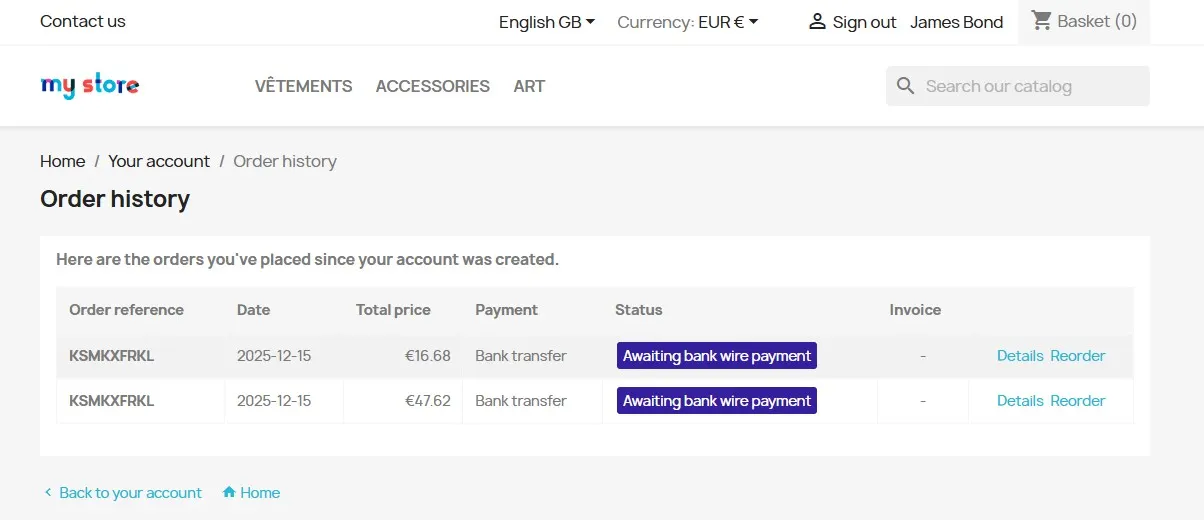
PrestaShop 9.1 introduces shipment-based order management, giving merchants the ability to split and merge shipments within a single order. This removes the long-standing “1 order = 1 carrier” limitation and improves clarity for both merchants and customers.
Watch the demo Read the article
Improved Discounts
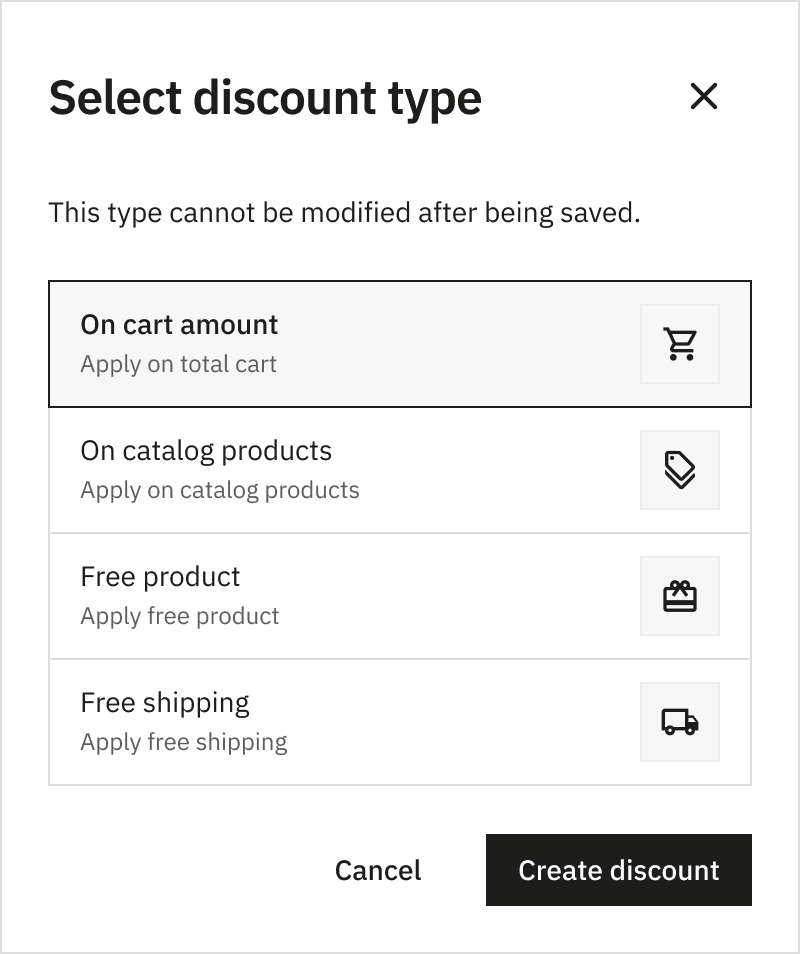
The discount system has been redesigned around four types: Catalog, Cart, Free Shipping, and Free Gift. This replaces the legacy cart rules with a clearer and more performant structure.
Watch the demo Read the article
Other notable improvements
Beyond the highlights above, PrestaShop 9.1 includes a large number of improvements across the platform.
New CLI commands
Three new console commands make it easier to manage your shop from the command line:
prestashop:thumbnails:regenerateto regenerate image thumbnails without going through the back office (#39478 by @iNem0o).prestashop:search:indexto trigger search indexation from the CLI (#39403 by @iNem0o).prestashop:module:export-translationsto export module translations into files (#39405 by @kpodemski).
PHP 8.5 support
PrestaShop 9.1 now supports PHP 8.1 through PHP 8.5, keeping the platform aligned with the latest PHP releases (#39211).
New hooks for module developers
Several new hooks give module developers more control over key moments in PrestaShop’s lifecycle:
actionUpdateDefaultCombinationAfterfor reacting to default combination changes (#40720 by @Codencode).- Hooks on module enable, disable, and upgrade events (#38839 by @studiokiwik).
- Hook on
Configuration::updateValueto react to configuration changes (#38956 by @studiokiwik). - Hooks to control free shipping price calculations (#40730 by @Hlavtox).
Tags page migrated to Symfony
The Tags management page has been fully migrated to Symfony, including the grid, filters, create/edit forms, and bulk actions (#39516, #39649, #39977 by @Progi1984).
Performance and security
- Significant cart performance improvement when a shop has many product combinations (#32058 by @MattKelvin).
- Ajax controllers are now noindexed to prevent search engines from crawling internal endpoints (#38785 by @PululuK).
- Two security vulnerabilities patched with the help of @clotairer from 202 ecommerce: stored XSS in back-office templates and improper use of validation framework (see PrestaShop 8.2.5 release for details).
Back office UX
- Two-step module upgrade process: download first, then install, for a safer update flow (#40130 by @dylanDenizonPresta).
- Product links in the order page now open in a new window (#38430 by @web-cooking-factory).
- CMS pages now have a preview link directly from the listing (#38431 by @web-cooking-factory).
Front office
- Special characters are now allowed in search queries (#39433 by @MattKelvin).
- Improved quantity input, add-to-cart button, and availability label behavior (#40538 by @Hlavtox).
- Proper delivery time display across the store (#40673 by @Hlavtox).
Bug fixes
This release includes more than 50 bug fixes that improve stability and reliability across the platform. See the full changelog below for details.
Adapt your solutions to PrestaShop 9.1
If you develop modules, themes, or custom integrations for PrestaShop, we recommend reviewing the notable changes introduced in this version. The documentation covers breaking changes, deprecated components, and updated best practices that may affect your solutions.
Review notable changes in PrestaShop 9.1
Changelog
v9.1.0
- Back Office:
- Improvement:
- GHSA-35pf-37c6-jxjv: Prevent XSS exploitation via unprotected variables in template
- GHSA-283w-xf3q-788v: Fix improper use of validation framework
- Bug fix:
- Improvement:
v9.1.0 RC1 (click to expand)
- Back Office:
- Improvement:
- #40720: Add actionUpdateDefaultCombinationAfter hook when default combination is set (by @Codencode)
- #40536: Add discountType endpoint (by @nicosomb)
- #40517: Add some help boxes to product page (by @Hlavtox)
- #40481: Improved UX for API client creation (by @kpodemski)
- #40330: Add usage limits fields for new discount system (by @boherm)
- #40094: Fix: Doctrine auto-mapping in modules: only the first subfolder inside src/Entity is recognized (by @Codencode)
- #39923: Improve wording of some settings, better explain the meaning of them (by @Hlavtox)
- #39459: Set optin and newsletter off for John DOE (by @Touxten)
- Bug fix:
- #40809: Clean discount form (by @jolelievre)
- #40743: Fix: Bug: when invoicing is disabled, changing order status to “paid=1” does not register any payment on the order (by @Codencode)
- #40710: Fix: Feature values count is duplicated when using “All shops” with multiple shops (by @Codencode)
- #40682: Fix the collision when we create / delete product customization in the same action (by @nicosomb)
- #40640: Fix EntitySearchInput::setValues forEach callback argument order (by @Codencode)
- #40620: Update AdminSecurity permissions logic in OrderController (by @rsoulard-prolaser)
- #40578: Dynamic pack quantity (by @jolelievre)
- #40563: Admin API improvements for combination endpoints (by @jolelievre)
- #40556: Fix: CsvFileReader service fails with “You have requested a non-existent service ‘session’” (by @Codencode)
- #40554: Fix: always display taxes total in order summary (by @Codencode)
- #40532: BO Product page, fix feature value collection indexes (by @jolelievre)
- #40525: Update module ps_apiresources (by @jolelievre)
- #40518: Fix position of minimum_product_quantity field in table (by @nicosomb)
- #40499: Fix: When saving an Attribute is_color_group is not updated (by @Codencode)
- #40475: Fix link for redirection on country BO page (by @jolelievre)
- #40433: Fix: Module update problem (by @Codencode)
- #40329: Prevent NoResultException when checking for existing translations (by @ChillCode)
- #40317: Fix: Backoffice data grids can yield different random results every time (by @Codencode)
- #40066: Fix: Admin Countries page redirect issue with multishop after changing shop (by @Codencode)
- #40054: Use URL when building urls to prevent subtle mistakes with &? (by @tswfi)
- #40050: Fix: Incorrect redirect from HTTP to HTTPS on the admin login page when PrestaShop is in a subfolder (by @Codencode)
- #40036: BO - Product: Fixed feature display in multishop (by @Progi1984)
- #39854: Fix: Quick Access links redirect to root instead of subdirectory, causing 404 (by @Codencode)
- #38775: Fix: Multishop - error loading CMS pages removed from the default shop (by @Codencode)
- Refactoring:
- Improvement:
- Front Office:
- New feature:
- Improvement:
- #40758: Secure table name with bqsql in DB and DBQuery #33539 backport (by @jf-viguier)
- #40733: Bump prestashop/hummingbird to 2.0 (by @Progi1984)
- #40572: Add feature during theme enabling to unhook specific modules (by @jolelievre)
- #40537: Remove unnecessary force refresh in checkout (by @Hlavtox)
- Bug fix:
- #40814: Update classic theme to 3.1.1 (by @jolelievre)
- #40626: Fix “Free shipping” displayed for discounts with free shipping off (by @Hlavtox)
- #40614: Fix “Free shipping” displayed on cart when a discount haven’t free shipping enabled and with a reduction amount = 0 (by @boherm)
- #40538: Fix quantity input, add to cart button and availability labels when items are added in a cart (by @Hlavtox)
- #40246: Fix preview in multilang (by @tleon)
- Refactoring:
- #40673: Use proper delivery times (by @Hlavtox)
- #40662: Corrects the error message when the quantity is less than 1 in cart (by @Touxten)
- #40653: Add cart product presenter and cart availability (by @Hlavtox)
- #40570: Prevent accidental usage of quantity_wanted from request (by @Hlavtox)
- #40406: Comment how language setting works in FO (by @Hlavtox)
- Core:
- New feature:
- Improvement:
- #40833: Bump apiresources to 0.5.0 (by @boherm)
- #40811: Backport missing workflows from develop to 9.1.x (by @jolelievre)
- #40768: Integrate new header-stamp for 9.1.x branch (by @jolelievre)
- #40765: Dynamic PHP matrix in workflows for 9.1.x (by @jolelievre)
- #40730: Add hooks that enable to control free shipping price (by @Hlavtox)
- #40678: Restore dev version for ps_apiresources (by @nicosomb)
- #40603: Clean old cart rule migration (by @jolelievre)
- #40596: Discounts for guest, test scenario (by @kpodemski)
- #40546: Command: Added CLI for checking fixtures translations (by @Progi1984)
- #40520: Skip removed modules on enable theme (by @jolelievre)
- #40467: Chore: update prestashop/dashproducts (by @mattgoud)
- #40381: Remove
curl_closeobsolete function calls (by @ShaiMagal) - #40359: Use node 20.19.5 by default to build assets (by @jolelievre)
- #40353: Dynamise hook documentation generation based on Version (by @jolelievre)
- #40350: Remove the composer config to ignore audit (by @jolelievre)
- #40342: Improved-shipment: Global refactorisation (by @M0rgan01)
- #40269: Prevent database inconsistencies by preventing faulty group delete calls (by @Hlavtox)
- #40133: Update ca-bundle from 1.3.7 to 1.5.9 (by @tswfi)
- Bug fix:
- #40823: Don’t add “default” if “default” already in name for getFormattedName (by @boherm)
- #40776: Replace github action that sets up mysql in CI (by @Touxten)
- #40762: Replace github action that sets up mysql in CI (by @Touxten)
- #40657: Fix configuration of Dev mode and Debug profiling in the back office (by @kpodemski)
- #40656: Fix getting specific price for a given customer group (by @kpodemski)
- #40590: Fix creating orders for guests (by @kpodemski)
- #40588: Update Changelog 9.0.3 (by @jolelievre)
- #40585: Preliminary tasks for patch version 9.0.3 (by @jolelievre)
- #40562: Update VAT rates for Estonia and Romania (by @Codencode)
- #40498: Fix: doctrine throws error from the beginning: There is no column with name “theme_name” on table “ps_image_type” (by @Codencode)
- #40496: Fix some type issues related to carriers (by @Hlavtox)
- #40480: Improvements to Makefile (by @kpodemski)
- #40479: Fix legacy profiler in the back office (by @kpodemski)
- #40423: Fix empty extra vars / product list when using the new automatic text email option (by @matrixino)
- #40400: Simplify cart rule minimal value by avoiding subtracting values (by @Hlavtox)
- #40040: Always request a non cached result in Order::getIdByCartId (by @ilsalvopss)
- Refactoring:
- #40798: Fix, comment and improve country initialization logic related to shipping (by @Hlavtox)
- #40604: Update classic to 3.0.6 (by @Hlavtox)
- #40432: Simplify some of cart logic to gradually move to single source of truth (by @Hlavtox)
- #40389: Comment logic related to addresses and their initialization (by @Hlavtox)
- Installer:
- Improvement:
- #40839: Update default catalog 9.1.x (by @ps-jarvis)
- #40824: Update default catalog 9.1.x (by @ps-jarvis)
- #40468: Update default catalog 9.1.x (by @ps-jarvis)
- #40397: Update default catalog 9.1.x (by @ps-jarvis)
- Bug fix:
- #40574: Fix Makefile to prevent build assets twice (by @jolelievre)
- #40457: Fix installation theme step order (by @jolelievre)
- #40077: Install Console: Allow characters “<” & “>” in admin password (by @Progi1984)
- Improvement:
- Web Services:
- Bug fix:
- #40442: Fix: PHP Fatal error when deleting product image by Webservice API #39111 (by @semicolonSimp)
- Bug fix:
- Localization:
- Bug fix:
- #40521: Fix default fixtures translation (by @jolelievre)
- Bug fix:
- Tests:
- Improvement:
- #40789: Functional Tests: Bump @prestashop-core/ui-testing (by @Progi1984)
- #40734: Functional Tests: Bump @prestashop-core/ui-testing (by @Progi1984)
- #40691: Functional Tests: Bump @prestashop-core/ui-testing (by @Progi1984)
- #40674: Functional Tests: Bump @prestashop-core/ui-testing (by @Progi1984)
- #40645: Functional Tests: Fixed campaigns (Part 5) (by @Progi1984)
- #40607: Functional Tests: Bump @prestashop-core/ui-testing (by @Progi1984)
- #40565: Functional Tests: Fixed campaigns (Part 4) (by @Progi1984)
- #40512: Functional Tests: Bump @prestashop-core/ui-testing (by @Progi1984)
- #40469: Functional Tests: Fixed campaigns (Part 3) (by @Progi1984)
- #40458: Functional Tests: Bump @prestashop-core/ui-testing (by @Progi1984)
- #40436: Functional Tests: Fixed campaigns (Part 2) (by @Progi1984)
- #40434: Functional Tests: Bump @prestashop-core/ui-testing (by @Progi1984)
- #40428: Functional Tests: Fixed campaigns (Part 1) (by @Progi1984)
- #40425: Functional Tests: Use Hummingbird as front theme for Audit/Modules/Regression/Sanity Scenarios (by @Progi1984)
- #40419: Functional Tests: Use Hummingbird as front theme for BO Scenarios (by @Progi1984)
- #40418: Enable Hummingbird as default theme (by @Progi1984)
- #40363: Functional Tests: Bump @prestashop-core/ui-testing (by @Progi1984)
- #40128: Functional Tests: Hummingbird 2 (as secondary theme) (by @Progi1984)
- Bug fix:
- #40684: Functional Tests: Enable scenarios (by @Progi1984)
- #40646: Fixtures: Enable payment modules for US (by @Progi1984)
- Refactoring:
- #40405: Functional tests - Add enable/disable the classic theme (by @nesrineabdmouleh)
- #40402: Functional tests - Delete enable/disable the theme hummingbird (by @nesrineabdmouleh)
- Improvement:
v9.1.0 Beta 1 (click to expand)
- Back Office:
- New feature:
- #39889: Send improved shipment feature flag to smarty on order history page (by @Nakahiru)
- #39873: Discount priority system (by @tleon)
- #39876: Add start and expiration date columns to discount list (by @mattgoud)
- #39741: Set validity date for discounts (by @tleon)
- #39789: Add limit to a single customer for discount (by @nicosomb)
- #39763: UI tests - Add new scenario to check multicarrier (by @nesrineabdmouleh)
- #39351: Condition based on feature (by @tleon)
- #39498: Add edit shipment page (by @PoulainMaxime)
- #39127: Add shipmentId on product list in order page detail (by @PoulainMaxime)
- #39138: Create split shipment form (by @ga-devfront)
- #39418: Discount attributes condition in form (by @jolelievre)
- #39363: Condition based on countries (by @tleon)
- #39246: Discount condition based on supplier (by @tleon)
- #39140: Condition based on categories (by @tleon)
- #39137: Create merge shipment form (by @M0rgan01)
- #39130: Add trigger on a brand for discount (by @nicosomb)
- #39093: Create shipment tab (by @M0rgan01)
- #39019: Add delete shipment product command for multishipment (by @PoulainMaxime)
- #39103: Discount specific product condition allows selection of combination (by @jolelievre)
- #38976: Add split shipment command for multishipment (by @PoulainMaxime)
- #38984: Add get shipment for viewing query (by @M0rgan01)
- #39087: Handle new type of Discount product condition based on restricted combinations (by @jolelievre)
- #38933: Add list available shipments for product query (by @PoulainMaxime)
- #38954: Add merge shipment command (by @PoulainMaxime)
- #38911: Add list available carriers query (by @M0rgan01)
- #38839: Add hooks on Module enable/disable/upgrade (by @studiokiwik)
- #38909: Add switch shipment carrier CQRS command (by @ga-devfront)
- #38842: Discount minimal cart product (by @jolelievre)
- #38867: Integrate discount conditions in form (by @tleon)
- #38746: Add product selection while creating free gift discount (by @nicosomb)
- #38837: Add delete discount command and list for api & bo (by @tleon)
- #38690: Cart & Order discount Form (add + update) (by @tleon)
- #38450: Order level discount (by @tleon)
- #38209: Add free gift discount (by @nicosomb)
- #38191: Add CQRS command for add & list shipment (by @PoulainMaxime)
- #38201: Add product level discounts (by @tleon)
- #38187: Add new discount page grid and creation popup (by @jolelievre)
- #38081: Add new discount cart level cqrs command (by @tleon)
- #38046: Add entities for multi-shipment (by @PoulainMaxime)
- #38111: Refactor Discount creation domain services and allow creation without names (by @jolelievre)
- #38040: Add feature flag for upcoming new shipment system (by @Nakahiru)
- #37911: Cart rule refacto command free shipping (by @tleon)
- Improvement:
- #40130: Add two-step process for module upgrade (download then install) (by @dylanDenizonPresta)
- #40230: Adds help text to product page fields (by @Hlavtox)
- #40247: Discount duplication (by @boherm)
- #40212: Update module api resources v0.2.0 (by @jolelievre)
- #40104: Bulk delete for discounts (by @boherm)
- #40103: Add new bulk enable/disable commands for discounts (by @boherm)
- #40089: Handle description field for discounts (by @tleon)
- #39951: New date filter component for discounts (by @tleon)
- #39977: Migration Admin Tags: Delete & Bulk Delete (by @Progi1984)
- #39979: Combine different types of trigger conditions (by @boherm)
- #39962: Sort modules and mails templates by name in translations (by @PululuK)
- #39649: Migration Admin Tags: Create & Edit Form (by @Progi1984)
- #39857: Rearrange discount form (by @nicosomb)
- #39629: Update d3 and nvd3 libs (by @boherm)
- #39662: Add discount compatibility (by @nicosomb)
- #39760: Address without linked brand (by @aomaxime)
- #37668: Add more specific filtering to Brand addresses listing (by @zelarg)
- #39579: Trigger error when split shipment with tracking number (by @PoulainMaxime)
- #39383: Improve performance of admin notifications (by @MattKelvin)
- #39536: Display right tab when the feature flag is enabled (by @PoulainMaxime)
- #39517: Add possibility to get multiple shipment id for one product (by @PoulainMaxime)
- #39516: Migration Admin Tags: Feature Flag & Grid (by @Progi1984)
- #39330: Improve “GetAvailableCarriers” query - filters (by @M0rgan01)
- #39338: Update CQRS discount commands and queries to handle the carriers (by @jolelievre)
- #38916: Add trigger with specific product in discount (by @nicosomb)
- #38889: Add form in BO to apply discount automatically or via promo code (by @boherm)
- #39055: Add more updateDiscountCommand Tests (by @tleon)
- #38956: Add hook on Configuration updateValue (by @studiokiwik)
- #38953: New generic form types, integration of minimum quantity and amount in the discount form (by @jolelievre)
- #38780: Discount form cards (by @jolelievre)
- #38561: Free shipping creation form (by @tleon)
- #38430: Open product link in new window in admin order page (by @web-cooking-factory)
- #38431: Add CMS Page preview link in listing in BO (by @web-cooking-factory)
- #38248: Add product discount integration + some tests improvements (by @tleon)
- #38000: Add new integration test for discount CQRS (by @tleon)
- Bug fix:
- #39926: Fix: handle SELECT fields without no_quotes in getSensitiveAttributes (by @Codencode)
- #40001: Fix redirect after editing root category to use current categoryId instead of PS_HOME_CATEGORY (by @Codencode)
- #39869: Update monologger to v3 (by @NKoonen)
- #40256: Fix: Issue retrieving product price when adding the first specific_price (by @Codencode)
- #40243: Admin API handle position update (by @jolelievre)
- #40257: Prevent saving ajax URL for future login redirection (by @jolelievre)
- #40112: Bump prestakit to v2.0.5 (by @Quetzacoalt91)
- #40267: Fix minimum amount discount cart conditions tax/shipping incl. or excl. (by @boherm)
- #40201: Fix path to legacy mail folder (by @Hlavtox)
- #40123: Update module api resources with new boolean rule (by @jolelievre)
- #39868: Show carrier deleted on edit shipment to avoid blocking edit (by @PoulainMaxime)
- #39883: Refactor discount-map.ts to use discountContainer for currency selector and reduction value symbol paths (by @tleon)
- #39880: Add virtual product filter for shipments (by @M0rgan01)
- #39810: Verify if carrier is linked to shipments for soft delete (by @PoulainMaxime)
- #39811: Fix product type discount (by @tleon)
- #39808: Add missing form type in catalog discount (by @tleon)
- #39706: Fix discount edition when no cart conditions were defined (by @nicosomb)
- #39448: Fix carrier grade validation and prevent fatal error (by @MattKelvin)
- #39262: Fix “get available carriers” query (by @M0rgan01)
- #39341: Fix shipments “items” (by @M0rgan01)
- #39302: Fix shipments tab (by @M0rgan01)
- #38603: Cast $orderMessage[‘message’] as string to prevent fatal error (by @josecarlosphp)
- #38763: Fix for setAmountDiscount constructor type (by @tleon)
- #38349: Discount feedbacks (by @tleon)
- #36374: Fix order detail price re-calculation (by @Jeremie-Kiwik)
- #37882: Fix: BO - Product Page - Display all features in feature choice, even if two features have the same name (by @Shagshag)
- Refactoring:
- New feature:
- Front Office:
- New feature:
- #39755: Add logic for new display on multishipment for order summary (by @PoulainMaxime)
- #38444: Show all carriers in the delivery option when FEATURE_FLAG_IMPROVED_SHIPMENT is enabled (by @Nakahiru)
- Improvement:
- #40248: Prevent Exposure of Sensitive Product Attributes in Front Office (by @M0rgan01)
- #39879: Add new format to multishipment display on order final summary (by @PoulainMaxime)
- #39787: Multi-carrier: added a property in OrderLazyArray (by @M0rgan01)
- #39097: Fix CartPresenter translation domain (by @PululuK)
- #39433: Allow special characters in search (by @MattKelvin)
- Bug fix:
- #39582: Fix: Product customization text field bug with using symbol {} (by @Codencode)
- #40117: Fix cart rule validation in front office (by @Hlavtox)
- #40262: Allow access to customized files preview without multi-lang enabled (by @kpodemski)
- #40137: Updated zxcvbn to a maintained version for consistency with backend checks (by @tleon)
- #40044: Multistore: Display countries only those covered by active carriers (by @Progi1984)
- #39788: Add check for enabled countries in cart and order (by @PrestaEdit)
- #35471: PrestashopDatabaseException on cart confirmation with free delivery cart rules in debug mode (by @clotairer)
- New feature:
- Core:
- New feature:
- #40356: Update & activate hummingbird (by @tleon)
- #40346: Update themes (by @tleon)
- #39478: Add console command “prestashop:thumbnails:regenerate” (by @iNem0o)
- #39403: Add SearchIndexationCommand to handle CLI search indexation (by @iNem0o)
- #39405: Export module translations command (by @kpodemski)
- #38484: Modify the shipment creation & remove order duplication for different carrier (by @PoulainMaxime)
- Improvement:
- #40349: Manual verifications (by @tleon)
- #40347: Update native modules (by @jolelievre)
- #40332: Restore original repository for ps_apiresources (by @nicosomb)
- #40293: Create fixtures for discount types (by @boherm)
- #40312: Bump to 9.0.3 (by @boherm)
- #40134: Docker: Fixed Install of xdebug (by @Progi1984)
- #39645: Add display parameter to generatePDF method (by @PrestaEdit)
- #40136: Add more logs in database dumping script (by @nicosomb)
- #39831: Add customer groups limit for discounts (by @nicosomb)
- #39570: Add new constraint to avoid having customizable product on free gift discount (by @boherm)
- #39424: Update CSSJanus to wikimedia/cssjanus (by @Krinkle)
- #39197: Added PrestaShop version in bin/console (by @Codencode)
- #39599: Update Cookie class documentation (by @djbuch)
- #38785: Noindex ajax controller (by @PululuK)
- #39029: Remove docker compose version, it is obsolete (by @tswfi)
- #38900: Bump to 9.1.0 (by @boherm)
- #38779: New order history retrieval filter (by @Kaikina)
- #37583: Update iframe-modal.ts DOM Text Interpreted As HTML (by @Shivam7-1)
- #38054: Change version to 9.1.0 (by @boherm)
- Bug fix:
- #40291: Removed useless aliases which cause issue with MariaDB (by @kpodemski)
- #40092: Fix composer and npm script in make file (by @tleon)
- #39864: Fix: Docker/Makefile fix (by @mattgoud)
- #39670: Fix log level for create-test-db (by @boherm)
- #32058: Improve cart performance when multiple product combinations (by @MattKelvin)
- #39569: Disable temporary order level discount to avoid issues (by @boherm)
- #36084: New Dispatcher methods to set Controller/FrontController (by @Markus-Gurkcity)
- #39233: Filemanager should load AdminKernel (by @Kaikina)
- #39349: Fixed version in the README version badge (by @tyloo)
- #38898: Improving typing (by @Kaikina)
- #37647: Fix incorrect @see reference in ModuleCore documentation (by @dali-rajab)
- Refactoring:
- #40295: Introduce Theme::getDefaultTheme method to replace classic hard-coded value (by @jolelievre)
- #39719: Remove tests & references to the cronjobs module (by @tleon)
- #38991: Change default product type to TYPE_STANDARD (by @Hlavtox)
- #38193: Removed extra repeated line (by @dali-rajab)
- #38014: Rename emailField to field for aligning the variable name with its actual purpose (by @jmartin82)
- #37411: Unify error handling in FO and get rid of Tools::displayError calls (by @Hlavtox)
- #37348: Add missing apostrophes to database queries (by @ShaiMagal)
- New feature:
- Installer:
- Improvement:
- #40354: Update default catalog 9.1.x (by @ps-jarvis)
- #39443: Allow to use static db prefix during installation (by @kpodemski)
- #35503: Improve GD test precision - check JPEG support (by @b44x)
- Bug fix:
- Improvement:
- Tests:
- Improvement:
- #40219: No more nightly for 8.0.x and 8.1.x (by @jolelievre)
- #40138: Functional Tests: Bump @prestashop-core/ui-testing (by @Progi1984)
- #39211: Added support for PHP 8.5 (by @Progi1984)
- #40046: Functional Tests: Unskip Test (by @Progi1984)
- #39984: Functional Tests: BO - Catalog price Rules: CRUD - Reduction type (by @Progi1984)
- #39973: Functional Tests: BO - Catalog price Rules: Bulk actions (by @Progi1984)
- #39963: Functional Tests: BO - Cart Rules: Quantity consumption (by @Progi1984)
- #39919: Bump behat/behat (v3.25.0 => v3.26.0) (by @Progi1984)
- #39515: Functional Tests: Migrate from CommonJS to NodeNext (by @Progi1984)
- #39256: Functional Tests: BO - Cart rules - Actions: Send a free gift (by @Progi1984)
- #39242: Functional Tests: BO - Cart rules - Actions: Exclude discounted products (by @Progi1984)
- #39234: Functional Tests: BO - Cart rules - Actions: Apply a discount to Selected product(s) (by @Progi1984)
- #39224: Functional Tests: BO - Cart rules - Actions: Apply a discount to Cheapest product (by @Progi1984)
- #39194: Functional Tests: BO - Cart rules - Actions: Apply a discount to Specific product (by @Progi1984)
- #39173: Functional Tests: Bump @prestashop-core/ui-testing (by @Progi1984)
- #39132: Functional Tests: BO - Cart rules - Actions: Apply a discount to Order (without shipping) (by @Progi1984)
- #39131: Functional Tests: BO - Cart rules - Actions: Apply a discount None (by @Progi1984)
- #39121: Functional Tests: BO - Cart rules - Actions: Apply a discount Amount (by @Progi1984)
- #39085: Functional Tests: BO - Cart rules - Actions: Apply a discount percent (by @Progi1984)
- #39067: Nightly: Remove 1.7.8 (by @Progi1984)
- #38949: Functional Tests: BO - Cart rules - Actions: Free shipping (by @Progi1984)
- #37844: Nightly: Fixed functional/BO/00*/04* (by @Progi1984)
- #37546: Nightly Build: Generate XML for each branch (by @Progi1984)
- #37512: Nightly: Create ZIP for each branch (by @Progi1984)
- Bug fix:
- #40225: Update valid_to dates in behat tests for discount FO (by @jolelievre)
- #39795: Functional Tests: Fixed functional/BO/03*/05*/brands/addresses/02* (by @Progi1984)
- #39493: Nightly: Fixed 8.2 (Missing API Config file) (by @Progi1984)
- #38542: Fix blocked CI (by @jolelievre)
- #37867: Nightly: Define Ubuntu Version for 8.1.x & 8.2.x (by @Progi1984)
- #37860: Functional Tests: actions/upload-artifact@v4 doesn’t support colon (by @Progi1984)
- Refactoring:
- #40298: Functional tests - Fix create account in FO classic theme test (by @nesrineabdmouleh)
- #39166: Refactor manufacturer behat tests (by @jolelievre)
- Improvement:
Download PrestaShop 9.1
Download the Classic version, which includes the PrestaShop core along with additional modules from PrestaShop SA compatible with this version, and integration with the PrestaShop Marketplace.
Creating a custom ZIP
If you prefer not to use the Classic version, you can build a custom ZIP file with the PrestaShop Release Creation tool:
- Clone the repository and check out the
9.1.0tag:git clone [email protected]:PrestaShop/PrestaShop.git && cd PrestaShop && git checkout 9.1.0 - Run
composer create-releaseorphp tools/build/CreateRelease.phpin the root of the repository. - The ZIP file will be generated in the
tools/build/releases/directory.
Requirements for PrestaShop 9.1
- PHP 8.1 (up to PHP 8.5 is supported)
- Composer 2
- Node.js 20 and NPM 10
Please check all system requirements in the documentation.
Update to PrestaShop 9.1
If you are running PrestaShop 9.0.x, you will be able to update to 9.1 using the Update Assistant module. A compatible version of the Update Assistant is being finalized and will be available in the coming days. We will update this article once it is ready.
As with any update, we strongly recommend:
- Back up your shop (files and database) before starting.
- Test the update in a staging environment before applying it to your production shop.
- Review your modules and themes for compatibility with 9.1.
Important
If you were testing a pre-release version (Beta or RC1), you cannot upgrade from it to the final release using the Update Assistant. Please use a fresh installation instead.Acknowledgments
PrestaShop 9.1 is the result of contributions from both the PrestaShop team and the open source community.
A huge thank you to everyone who contributed to this release! Your dedication helps make PrestaShop stronger, more secure, and better for everyone. We truly appreciate your time and expertise.
Want to join the movement? Start contributing today and help shape the future of open source e-commerce!
 aomaxime
 b44x
b44x
 boherm
 ChillCode
 clotairer
 Codencode
 dali-rajab
 djbuch
 dylanDenizonPresta
 ga-devfront
 Hlavtox
 ilsalvopss
 iNem0o
 Jeremie-Kiwik
 jf-viguier
 jmartin82
 jolelievre
 josecarlosphp
 Kaikina
 kpodemski
 Krinkle
 M0rgan01
 Markus-Gurkcity
 matrixino
 mattgoud
 MattKelvin
 Nakahiru
 nesrineabdmouleh
 nicosomb
 NKoonen
 PoulainMaxime
 PrestaEdit
 Progi1984
 PululuK
 Quetzacoalt91
 rsoulard-prolaser
 semicolonSimp
 Shagshag
 ShaiMagal
 Shivam7-1
 studiokiwik
 tleon
tleon
 Touxten
 tswfi
tswfi
 tyloo
tyloo
 web-cooking-factory
 zelarg
What’s next?
Work on the next version of PrestaShop is already underway. Stay tuned to the build blog and follow the project on GitHub to keep up with the latest developments.
We encourage you to share your feedback on PrestaShop 9.1 in the dedicated discussion thread or on Slack.