
Hummingbird v2: Architecture, Best Practices, and Contribution Guide
A developer-oriented foundation for modern and scalable PrestaShop themes
Following the beta phase and valuable community feedback, Hummingbird v2 introduces a clearer architecture, stronger separation of concerns and a solid foundation for modern theme development.

With v2, Hummingbird becomes the new reference theme for PrestaShop, offering a structured and scalable baseline for building, customizing, and extending storefronts.
Hummingbird v2 is not just an incremental update — it’s a structural evolution. It revisits how SCSS is organized, how Bootstrap and PrestaShop styles are integrated and overridden, as well as how developers can approach customization and contribution in a more predictable way.
Whether you are building a custom theme, extending a store, or contributing to the ecosystem, Hummingbird v2 provides a reliable foundation to build upon.
This article is primarily aimed at theme developers, module authors, and front-end contributors working with PrestaShop.
In this article, we’ll cover:
- A quick overview of what changed in v2
- The philosophy behind the new architecture
- Six best practices for working with Hummingbird v2
- A forward-looking discussion on JavaScript conventions and patterns
- Guidance for contributing effectively
🚀 What’s New in Hummingbird v2
1) Clear Separation Between Bootstrap and PrestaShop
One of the core goals of v2 is clarity. Bootstrap and PrestaShop are now explicitly separated in the styling architecture.
This makes it easier to distinguish:
- What comes from Bootstrap (e.g., grid system, modals, basic buttons)
- What comes from PrestaShop (e.g., checkout structure, default layouts, core components)
- What is theme-specific customization (e.g., colors, typography, component styling)
By isolating responsibilities, Hummingbird v2 reduces cross-impact between frameworks, prevents accidental overrides, and makes customization and debugging more predictable.
2) CSS Cascade Layers with @layer
Hummingbird v2 adopts CSS cascade layers (@layer) to explicitly control style priority and reduce specificity conflicts.
Why this matters
Instead of fighting specificity wars, developers can rely on predictable layer order. The cascade becomes intentional, predictable, and easier to reason about.
Design choice: unlayered CSS intentionally retains higher cascade priority so that modules remain visually independent. This protects backward compatibility and allows gradual adoption of @layer across the ecosystem.
Theme layer priority (from lowest to highest within Hummingbird):
| Layers | Descriptions |
|---|---|
| vendors | Third-party styles excluding Bootstrap (e.g., Material Icons) |
| bs-base | Bootstrap base styles (e.g., resets, typography) |
| bs-components | Bootstrap components (buttons, modals, forms, etc.) |
| bs-custom-components | Custom modifications to Bootstrap components |
| ps-base | PrestaShop base styles (default theme) |
| ps-components | PrestaShop-specific components (e.g., product cards, checkout styles) |
| ps-modules | Module-specific styles (e.g., payment, shipping modules) |
| utilities | Utility classes (margin, padding, visibility helpers) |
Note: When selector specificity is equal, later layers override earlier ones.
Why this architecture helps
✅ Bootstrap integrity → safer upgrades
✅ PrestaShop compatibility → reduced cross-impact
✅ Predictable customization → fewer specificity battles
3) Revised SCSS Architecture
The SCSS structure is now organized by responsibility rather than legacy grouping. Previously, styles for Bootstrap, PrestaShop, and theme customizations were scattered across folders like core/, custom/, and partials/, creating overlap and confusion.
The new structure groups styles by purpose, making the codebase easier to navigate and maintain as the project grows.
High-level structure:
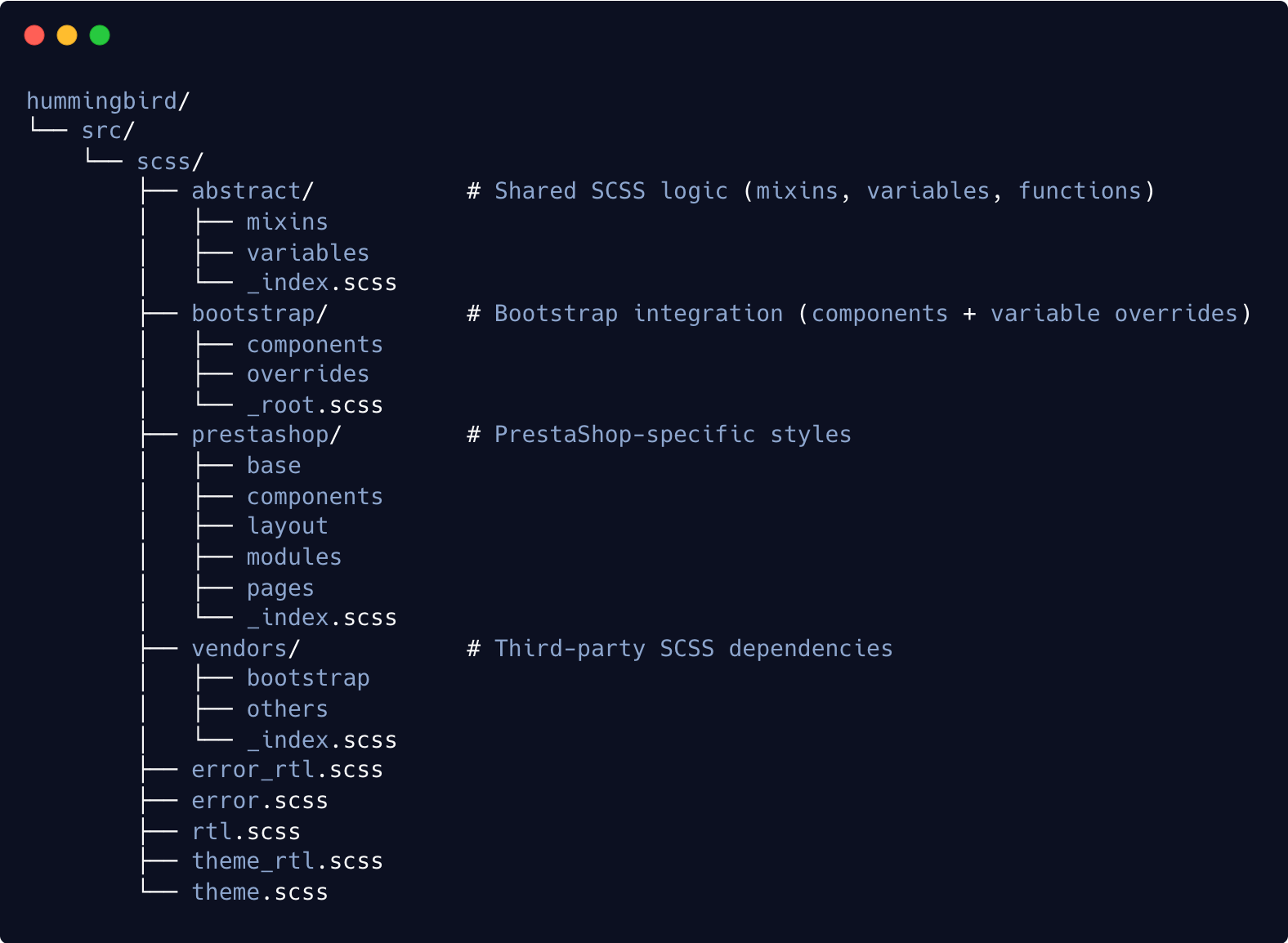
Each directory has a clear role:
- Shared logic lives in
abstract - Framework code stays in
bootstraporvendors - PrestaShop styling is isolated in
prestashop
Benefits
- Faster onboarding
- Clearer file organization
- Safer overrides
- Better scalability
- Stronger long-term maintainability
This responsibility-driven structure provides a more solid foundation for future contributions and evolution of the theme.
4) Other Notable Improvements
Beyond architecture, Hummingbird v2 brings improvements in performance, accessibility, and developer experience.
Highlights include faster loading, improved SEO foundations, stronger accessibility compliance, removal of jQuery as a theme dependency, and a modernized workflow.
🔗 See the official release notes for the full changelog
✅ 6 Best Practices for Hummingbird v2 Developers

1) Respect the Layering Strategy
Cascade layers define how styles should be structured.
Hummingbird’s layer order is intentional and should not be changed unless you fully understand the cascade impact.
- Place overrides in the right layer
- Avoid high-specificity shortcuts
- Use
utilitiesonly for small tweaks
Respecting layer order keeps styling predictable and avoids specificity wars.
2) Prefer Configuration Over Overrides
Customize through configuration first, overrides second.
Before adding custom CSS or modifying templates, ask yourself:
- Can this be solved by adjusting existing SCSS variables or design tokens?
- Can I achieve this using existing utility classes?
- Can I extend the component without rewriting it?
For Bootstrap specifically:
- Prefer overriding Bootstrap variables rather than rewriting component styles
- Follow Bootstrap’s documented customization patterns
- Add custom CSS only when configuration is insufficient
Large overrides and template rewrites increase maintenance cost and upgrade risk. Smaller, layered adjustments are easier to maintain and scale better over time.
3) Treat PrestaShop Core Templates Carefully
Many core features rely on specific DOM structures refreshed via Ajax.
Removing IDs or changing markup can silently break features like cart updates or quickview.
Best practices:
- Preserve required DOM structure
- Adapt JS if markup changes
- Be careful with IDs and data attributes
- Document structural changes
When possible, extend markup rather than restructuring it.

4) Contribute with Architecture in Mind
Contributions should improve clarity and maintainability.
- Respect separation of concerns
- Prefer readable solutions
- Follow BEM methodology
- Use vanilla JS, Bootstrap, and PrestaShop built-in JS instead of jQuery
- Align with existing patterns
A good contribution is easy to understand and build upon.
5) Favor Consistency, Simplicity, and Performance
- Reuse patterns
- Follow conventions
- Avoid unnecessary JavaScript and dependencies
- Prefer native browser features
- Consider performance
💡 Illustrative example:
Instead of attaching JavaScript to .cart-item (a styling class), using data-ps-component="cart-item" helps avoid breakage when styles change.
This simplified example illustrates the principle of separating styling and behavior. Applying this principle consistently helps keep the theme maintainable and sustainable over time.
6) Keep Accessibility in Mind
Accessibility should be treated as a baseline expectation, not an optional enhancement.
- Keep semantic HTML and ARIA
- Ensure keyboard navigation
- Maintain color contrast
- Test real user flows
Accessibility benefits everyone, helps future-proof your theme, and is increasingly a requirement in many regions and markets — not just a best practice.
🎓 A Note on JavaScript Conventions

While Hummingbird v2 focuses on styling, JavaScript consistency is a key future topic.
A promising direction is semantic data-* attributes and declarative DOM mapping instead of styling classes or inline handlers.
Some of these ideas are already being experimented with inside Hummingbird v2.
Today, many behaviors rely on undocumented classes — sometimes js- prefixed, sometimes not — which makes front-ends fragile and hard to maintain.
Moving toward documented behavioral attributes like data-ps-* reduces accidental breakage and separates style from logic.
Patterns like:
data-ps-componentdata-ps-actiondata-ps-targetdata-ps-state- Centralized selector maps
- MutationObserver-friendly components
can improve modularity and resilience.
This is a forward-looking topic that deserves community discussion and experimentation. A dedicated discussion is 🔗 available here, where we outline the direction we aim to explore for JavaScript conventions in themes — and potentially in PrestaShop core.
Feedback, experiments, and real-world testing are very welcome. Insights from theme and module developers will be essential in shaping conventions that are practical, robust, and beneficial for the entire ecosystem.
🔨 How to Contribute
Hummingbird evolves through community input.
You can contribute by:
- Testing real use cases
- Reporting issues
- Suggesting improvements
- Sharing best practices
- Opening well-documented PRs
Think in terms of long-term ecosystem value.
🏁 Final Thoughts

Hummingbird v2 sets a direction for the future of PrestaShop theming — and that future is shaped by the community that builds with it.
With clearer architecture, cascade layers, and structured conventions, developers gain:
- Predictable styling
- Safer overrides
- Easier collaboration
- Smoother upgrades
As shared conventions grow, the ecosystem becomes more consistent and easier to evolve.
If you build themes or modules, now is a great time to explore Hummingbird v2 and help shape its future.
The future of PrestaShop theming is not only about better code — it’s about shared conventions that help the ecosystem grow sustainably.